Autenticación con Herramientas
Muchas herramientas necesitan acceder a recursos protegidos (como datos de usuario en Google Calendar, registros de Salesforce, etc.) y requieren autenticación. ADK proporciona un sistema para manejar varios métodos de autenticación de forma segura.
Los componentes clave involucrados son:
AuthScheme: Define cómo una API espera las credenciales de autenticación (por ejemplo, como una API Key en un encabezado, un token Bearer de OAuth 2.0). ADK soporta los mismos tipos de esquemas de autenticación que OpenAPI 3.0. Para saber más sobre qué es cada tipo de credencial, consulta OpenAPI doc: Authentication. ADK usa clases específicas comoAPIKey,HTTPBearer,OAuth2,OpenIdConnectWithConfig.AuthCredential: Contiene la información inicial necesaria para iniciar el proceso de autenticación (por ejemplo, el OAuth Client ID/Secret de tu aplicación, un valor de API key). Incluye unauth_type(comoAPI_KEY,OAUTH2,SERVICE_ACCOUNT) que especifica el tipo de credencial.
El flujo general involucra proporcionar estos detalles al configurar una herramienta. ADK luego intenta intercambiar automáticamente la credencial inicial por una utilizable (como un access token) antes de que la herramienta haga una llamada a la API. Para flujos que requieren interacción del usuario (como el consentimiento OAuth), se activa un proceso interactivo específico que involucra la aplicación Agent Client.
Tipos de Credenciales Iniciales Soportados
- API_KEY: Para autenticación simple de clave/valor. Usualmente no requiere intercambio.
- HTTP: Puede representar autenticación básica (no recomendada/soportada para intercambio) o tokens Bearer ya obtenidos. Si es un token Bearer, no se necesita intercambio.
- OAUTH2: Para flujos estándar de OAuth 2.0. Requiere configuración (client ID, secret, scopes) y frecuentemente activa el flujo interactivo para el consentimiento del usuario.
- OPEN_ID_CONNECT: Para autenticación basada en OpenID Connect. Similar a OAuth2, frecuentemente requiere configuración e interacción del usuario.
- SERVICE_ACCOUNT: Para credenciales de Service Account de Google Cloud (clave JSON o Application Default Credentials). Típicamente se intercambian por un token Bearer.
Configuración de Autenticación en Herramientas
Configuras la autenticación al definir tu herramienta:
-
RestApiTool / OpenAPIToolset: Pasa
auth_schemeyauth_credentialdurante la inicialización -
Herramientas de GoogleApiToolSet: ADK tiene herramientas de primera parte incorporadas como Google Calendar, BigQuery, etc. Usa el método específico del toolset.
-
APIHubToolset / ApplicationIntegrationToolset: Pasa
auth_schemeyauth_credentialdurante la inicialización, si la API gestionada en API Hub / proporcionada por Application Integration requiere autenticación.
ADVERTENCIA
Almacenar credenciales sensibles como access tokens y especialmente refresh tokens directamente en el estado de sesión podría plantear riesgos de seguridad dependiendo de tu backend de almacenamiento de sesión (SessionService) y la postura de seguridad general de la aplicación.
InMemorySessionService: Adecuado para pruebas y desarrollo, pero los datos se pierden cuando el proceso termina. Menor riesgo ya que es transitorio.- Base de Datos/Almacenamiento Persistente: Considera fuertemente encriptar los datos del token antes de almacenarlos en la base de datos usando una biblioteca de encriptación robusta (como
cryptography) y gestionar las claves de encriptación de forma segura (por ejemplo, usando un servicio de gestión de claves). - Almacenes de Secretos Seguros: Para entornos de producción, almacenar credenciales sensibles en un gestor de secretos dedicado (como Google Cloud Secret Manager o HashiCorp Vault) es el enfoque más recomendado. Tu herramienta podría potencialmente almacenar solo access tokens de corta duración o referencias seguras (no el refresh token en sí) en el estado de sesión, obteniendo los secretos necesarios del almacén seguro cuando sea necesario.
Recorrido 1: Construcción de Aplicaciones Agénticas con Herramientas Autenticadas
Esta sección se enfoca en usar herramientas preexistentes (como aquellas de RestApiTool/ OpenAPIToolset, APIHubToolset, GoogleApiToolSet) que requieren autenticación dentro de tu aplicación agéntica. Tu responsabilidad principal es configurar las herramientas y manejar la parte del lado del cliente de los flujos de autenticación interactivos (si son requeridos por la herramienta).
1. Configuración de Herramientas con Autenticación
Al agregar una herramienta autenticada a tu agente, necesitas proporcionar su AuthScheme requerido y la AuthCredential inicial de tu aplicación.
A. Usando Toolsets basados en OpenAPI (OpenAPIToolset, APIHubToolset, etc.)
Pasa el scheme y la credential durante la inicialización del toolset. El toolset los aplica a todas las herramientas generadas. Aquí hay algunas formas de crear herramientas con autenticación en ADK.
Crear una herramienta que requiere una API Key.
from google.adk.tools.openapi_tool.auth.auth_helpers import token_to_scheme_credential
from google.adk.tools.openapi_tool.openapi_spec_parser.openapi_toolset import OpenAPIToolset

auth_scheme, auth_credential = token_to_scheme_credential(
    "apikey", "query", "apikey", "YOUR_API_KEY_STRING"
)
sample_api_toolset = OpenAPIToolset(
    spec_str="...",  # Completa esto con una cadena de especificación OpenAPI
    spec_str_type="yaml",
    auth_scheme=auth_scheme,
    auth_credential=auth_credential,
)
Crear una herramienta que requiere OAuth2.
from google.adk.tools.openapi_tool.openapi_spec_parser.openapi_toolset import OpenAPIToolset
from fastapi.openapi.models import OAuth2
from fastapi.openapi.models import OAuthFlowAuthorizationCode
from fastapi.openapi.models import OAuthFlows
from google.adk.auth import AuthCredential
from google.adk.auth import AuthCredentialTypes
from google.adk.auth import OAuth2Auth

auth_scheme = OAuth2(
    flows=OAuthFlows(
        authorizationCode=OAuthFlowAuthorizationCode(
            authorizationUrl="https://accounts.google.com/o/oauth2/auth",
            tokenUrl="https://oauth2.googleapis.com/token",
            scopes={
                "https://www.googleapis.com/auth/calendar": "calendar scope"
            },
        )
    )
)
auth_credential = AuthCredential(
    auth_type=AuthCredentialTypes.OAUTH2,
    oauth2=OAuth2Auth(
        client_id=YOUR_OAUTH_CLIENT_ID,
        client_secret=YOUR_OAUTH_CLIENT_SECRET
    ),
)

calendar_api_toolset = OpenAPIToolset(
    spec_str=google_calendar_openapi_spec_str, # Completa esto con una especificación openapi
    spec_str_type='yaml',
    auth_scheme=auth_scheme,
    auth_credential=auth_credential,
)
Crear una herramienta que requiere Service Account.
from google.adk.tools.openapi_tool.auth.auth_helpers import service_account_dict_to_scheme_credential
from google.adk.tools.openapi_tool.openapi_spec_parser.openapi_toolset import OpenAPIToolset

service_account_cred = json.loads(service_account_json_str)
auth_scheme, auth_credential = service_account_dict_to_scheme_credential(
    config=service_account_cred,
    scopes=["https://www.googleapis.com/auth/cloud-platform"],
)
sample_toolset = OpenAPIToolset(
    spec_str=sa_openapi_spec_str, # Completa esto con una especificación openapi
    spec_str_type='json',
    auth_scheme=auth_scheme,
    auth_credential=auth_credential,
)
Crear una herramienta que requiere OpenID connect.
from google.adk.auth.auth_schemes import OpenIdConnectWithConfig
from google.adk.auth.auth_credential import AuthCredential, AuthCredentialTypes, OAuth2Auth
from google.adk.tools.openapi_tool.openapi_spec_parser.openapi_toolset import OpenAPIToolset

auth_scheme = OpenIdConnectWithConfig(
    authorization_endpoint=OAUTH2_AUTH_ENDPOINT_URL,
    token_endpoint=OAUTH2_TOKEN_ENDPOINT_URL,
    scopes=['openid', 'YOUR_OAUTH_SCOPES"]
)
auth_credential = AuthCredential(
    auth_type=AuthCredentialTypes.OPEN_ID_CONNECT,
    oauth2=OAuth2Auth(
        client_id="...",
        client_secret="...",
    )
)

userinfo_toolset = OpenAPIToolset(
    spec_str=content, # Completa con una especificación actual
    spec_str_type='yaml',
    auth_scheme=auth_scheme,
    auth_credential=auth_credential,
)
B. Usando Google API Toolsets (por ejemplo, calendar_tool_set)
Estos toolsets frecuentemente tienen métodos de configuración dedicados.
Consejo: Para saber cómo crear un Google OAuth Client ID & Secret, consulta esta guía: Get your Google API Client ID
# Ejemplo: Configuración de Google Calendar Tools
from google.adk.tools.google_api_tool import calendar_tool_set

client_id = "YOUR_GOOGLE_OAUTH_CLIENT_ID.apps.googleusercontent.com"
client_secret = "YOUR_GOOGLE_OAUTH_CLIENT_SECRET"

# Usa el método de configuración específico para este tipo de toolset
calendar_tool_set.configure_auth(
    client_id=oauth_client_id, client_secret=oauth_client_secret
)

# agent = LlmAgent(..., tools=calendar_tool_set.get_tool('calendar_tool_set'))
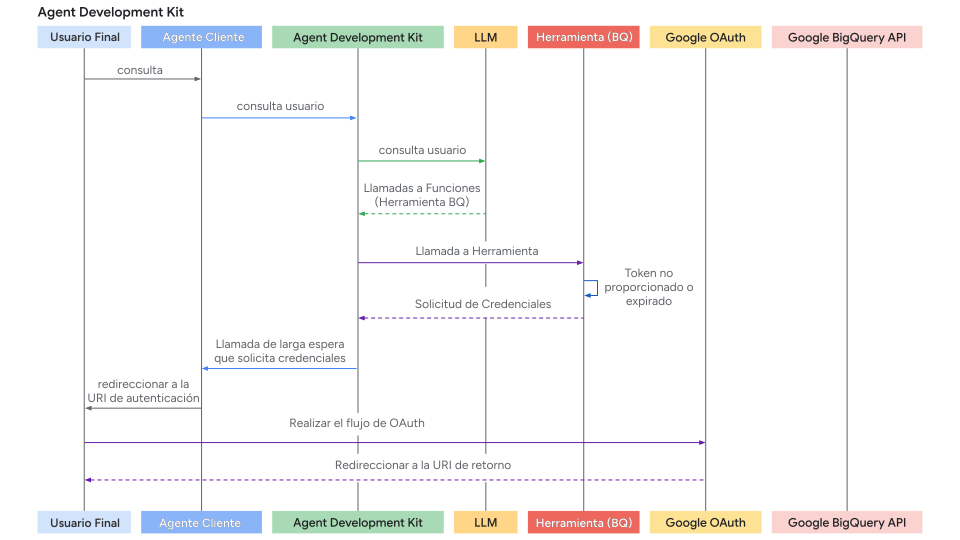
El diagrama de secuencia del flujo de solicitud de autenticación (donde las herramientas solicitan credenciales de autenticación) se ve así:
2. Manejo del Flujo Interactivo OAuth/OIDC (Lado del Cliente)
Si una herramienta requiere inicio de sesión/consentimiento del usuario (típicamente OAuth 2.0 u OIDC), el framework ADK pausa la ejecución y señala a tu aplicación Agent Client. Hay dos casos:
- La aplicación Agent Client ejecuta el agente directamente (vía
runner.run_async) en el mismo proceso. Por ejemplo, backend de UI, aplicación CLI o trabajo Spark, etc. - La aplicación Agent Client interactúa con el servidor fastapi de ADK vía el endpoint
/runo/run_sse. Mientras que el servidor fastapi de ADK podría estar configurado en el mismo servidor o en un servidor diferente que la aplicación Agent Client
El segundo caso es un caso especial del primer caso, porque el endpoint /run o /run_sse también invoca runner.run_async. Las únicas diferencias son:
- Si llamar a una función python para ejecutar el agente (primer caso) o llamar a un endpoint de servicio para ejecutar el agente (segundo caso).
- Si los eventos de resultado son objetos en memoria (primer caso) o cadenas json serializadas en la respuesta http (segundo caso).
Las secciones siguientes se enfocan en el primer caso y deberías poder mapearlo al segundo caso de manera muy directa. También describiremos algunas diferencias a manejar para el segundo caso si es necesario.
Aquí está el proceso paso a paso para tu aplicación cliente:
Paso 1: Ejecutar Agente y Detectar Solicitud de Autenticación
- Inicia la interacción del agente usando
runner.run_async. - Itera a través de los eventos generados.
- Busca un evento específico de llamada a función cuya llamada a función tiene un nombre especial:
adk_request_credential. Este evento señala que se necesita interacción del usuario. Puedes usar funciones auxiliares para identificar este evento y extraer la información necesaria. (Para el segundo caso, la lógica es similar. Deserializas el evento de la respuesta http).
# runner = Runner(...)
# session = await session_service.create_session(...)
# content = types.Content(...) # Consulta inicial del usuario

print("\nRunning agent...")
events_async = runner.run_async(
    session_id=session.id, user_id='user', new_message=content
)

auth_request_function_call_id, auth_config = None, None

async for event in events_async:
    # Usa un helper para verificar el evento específico de solicitud de autenticación
    if (auth_request_function_call := get_auth_request_function_call(event)):
        print("--> Authentication required by agent.")
        # Almacena el ID necesario para responder más tarde
        if not (auth_request_function_call_id := auth_request_function_call.id):
            raise ValueError(f'Cannot get function call id from function call: {auth_request_function_call}')
        # Obtén el AuthConfig que contiene el auth_uri, etc.
        auth_config = get_auth_config(auth_request_function_call)
        break # Detén el procesamiento de eventos por ahora, necesitas interacción del usuario

if not auth_request_function_call_id:
    print("\nAuth not required or agent finished.")
    # return # O maneja la respuesta final si se recibió
Funciones auxiliares helpers.py:
from google.adk.events import Event
from google.adk.auth import AuthConfig # Importa el tipo necesario
from google.genai import types

def get_auth_request_function_call(event: Event) -> types.FunctionCall:
    # Obtiene la llamada a función especial de solicitud de autenticación del evento
    if not event.content or not event.content.parts:
        return
    for part in event.content.parts:
        if (
            part
            and part.function_call
            and part.function_call.name == 'adk_request_credential'
            and event.long_running_tool_ids
            and part.function_call.id in event.long_running_tool_ids
        ):

            return part.function_call

def get_auth_config(auth_request_function_call: types.FunctionCall) -> AuthConfig:
    # Extrae el objeto AuthConfig de los argumentos de la llamada a función de solicitud de autenticación
    if not auth_request_function_call.args or not (auth_config := auth_request_function_call.args.get('authConfig')):
        raise ValueError(f'Cannot get auth config from function call: {auth_request_function_call}')
    if isinstance(auth_config, dict):
        auth_config = AuthConfig.model_validate(auth_config)
    elif not isinstance(auth_config, AuthConfig):
        raise ValueError(f'Cannot get auth config {auth_config} is not an instance of AuthConfig.')
    return auth_config
Paso 2: Redirigir al Usuario para Autorización
- Obtén la URL de autorización (
auth_uri) delauth_configextraído en el paso anterior. - Crucialmente, agrega tu redirect_uri de aplicación como un parámetro de consulta a este
auth_uri. Esteredirect_uridebe estar pre-registrado con tu proveedor OAuth (por ejemplo, Google Cloud Console, panel de administración de Okta). - Dirige al usuario a esta URL completa (por ejemplo, ábrela en su navegador).
# (Continuando después de detectar que se necesita autenticación)

if auth_request_function_call_id and auth_config:
    # Obtén la URL base de autorización del AuthConfig
    base_auth_uri = auth_config.exchanged_auth_credential.oauth2.auth_uri

    if base_auth_uri:
        redirect_uri = 'http://localhost:8000/callback' # DEBE coincidir con la configuración de tu aplicación cliente OAuth
        # Agrega redirect_uri (usa urlencode en producción)
        auth_request_uri = base_auth_uri + f'&redirect_uri={redirect_uri}'
        # Ahora necesitas redirigir a tu usuario final a esta auth_request_uri o pedirle que abra esta auth_request_uri en su navegador
        # Esta auth_request_uri debe ser servida por el proveedor de autenticación correspondiente y el usuario final debe iniciar sesión y autorizar a tu aplicación para acceder a sus datos
        # Y luego el proveedor de autenticación redirigirá al usuario final al redirect_uri que proporcionaste
        # Siguiente paso: Obtén esta URL de callback del usuario (o tu manejador de servidor web)
    else:
         print("ERROR: Auth URI not found in auth_config.")
         # Maneja el error
Paso 3. Manejar el Callback de Redirección (Cliente):
- Tu aplicación debe tener un mecanismo (por ejemplo, una ruta de servidor web en el
redirect_uri) para recibir al usuario después de que autorice la aplicación con el proveedor. - El proveedor redirige al usuario a tu
redirect_uriy agrega unauthorization_code(y potencialmentestate,scope) como parámetros de consulta a la URL. - Captura la URL de callback completa de esta solicitud entrante.
- (Este paso ocurre fuera del bucle principal de ejecución del agente, en tu servidor web o manejador de callback equivalente.)
Paso 4. Enviar Resultado de Autenticación de Vuelta a ADK (Cliente):
- Una vez que tengas la URL de callback completa (que contiene el código de autorización), recupera el
auth_request_function_call_idy el objetoauth_configguardados en el Paso 1 del Cliente. - Establece la URL de callback capturada en el campo
exchanged_auth_credential.oauth2.auth_response_uri. También asegúrate de queexchanged_auth_credential.oauth2.redirect_uricontenga el redirect URI que usaste. - Crea un objeto
types.Contentque contenga untypes.Partcon untypes.FunctionResponse.- Establece
namea"adk_request_credential". (Nota: Este es un nombre especial para que ADK proceda con la autenticación. No uses otros nombres.) - Establece
idalauth_request_function_call_idque guardaste. - Establece
responseal objetoAuthConfigactualizado serializado (por ejemplo,.model_dump()).
- Establece
- Llama a
runner.run_asyncnuevamente para la misma sesión, pasando este contenidoFunctionResponsecomo elnew_message.
# (Continuando después de la interacción del usuario)

    # Simula obtener la URL de callback (por ejemplo, del pegado del usuario o manejador web)
    auth_response_uri = await get_user_input(
        f'Paste the full callback URL here:\n> '
    )
    auth_response_uri = auth_response_uri.strip() # Limpia la entrada

    if not auth_response_uri:
        print("Callback URL not provided. Aborting.")
        return

    # Actualiza el AuthConfig recibido con los detalles del callback
    auth_config.exchanged_auth_credential.oauth2.auth_response_uri = auth_response_uri
    # También incluye el redirect_uri usado, ya que el intercambio de token podría necesitarlo
    auth_config.exchanged_auth_credential.oauth2.redirect_uri = redirect_uri

    # Construye el objeto Content de FunctionResponse
    auth_content = types.Content(
        role='user', # El rol puede ser 'user' al enviar un FunctionResponse
        parts=[
            types.Part(
                function_response=types.FunctionResponse(
                    id=auth_request_function_call_id,       # Vincula a la solicitud original
                    name='adk_request_credential', # Nombre especial de función del framework
                    response=auth_config.model_dump() # Envía de vuelta el AuthConfig *actualizado*
                )
            )
        ],
    )

    # --- Reanudar Ejecución ---
    print("\nSubmitting authentication details back to the agent...")
    events_async_after_auth = runner.run_async(
        session_id=session.id,
        user_id='user',
        new_message=auth_content, # Envía el FunctionResponse de vuelta
    )

    # --- Procesar Salida Final del Agente ---
    print("\n--- Agent Response after Authentication ---")
    async for event in events_async_after_auth:
        # Procesa los eventos normalmente, esperando que la llamada a la herramienta tenga éxito ahora
        print(event) # Imprime el evento completo para inspección
Nota: Respuesta de autorización con la función Resume
Si tu flujo de trabajo del agente ADK está configurado con la
función Resume, también debes incluir
el ID de Invocación (invocation_id) como parámetro con la respuesta
de autorización. El ID de Invocación que proporciones debe ser la misma
invocación que generó la solicitud de autorización, de lo contrario el
sistema inicia una nueva invocación con la respuesta de autorización. Si tu
agente usa la función Resume, considera incluir el ID de Invocación
como un parámetro con tu solicitud de autorización, para que pueda ser incluido
con la respuesta de autorización. Para más detalles sobre el uso de la función
Resume, consulta
Resume stopped agents.
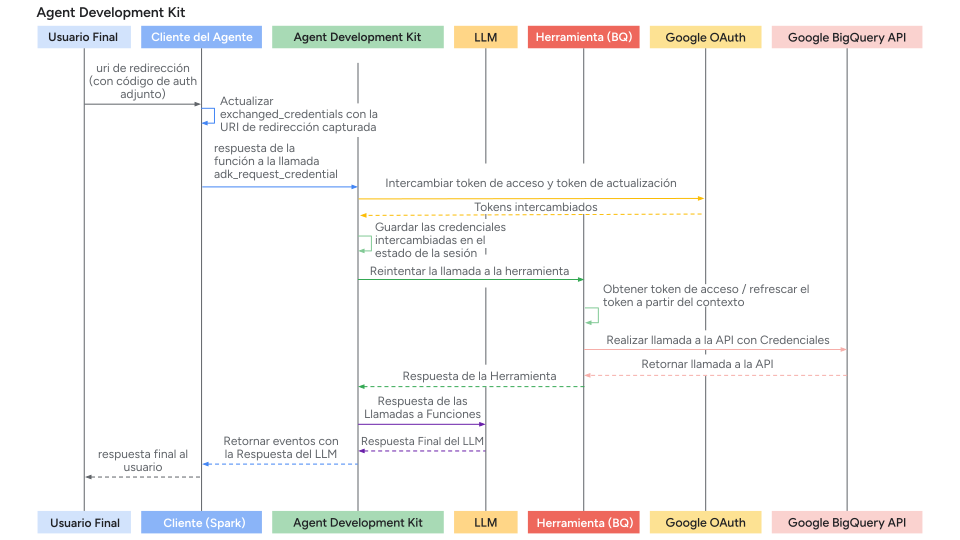
Paso 5: ADK Maneja el Intercambio de Token y Reintento de Herramienta y obtiene el Resultado de la Herramienta
- ADK recibe el
FunctionResponseparaadk_request_credential. - Usa la información en el
AuthConfigactualizado (incluyendo la URL de callback que contiene el código) para realizar el intercambio de token OAuth con el endpoint de token del proveedor, obteniendo el access token (y posiblemente el refresh token). - ADK hace que estos tokens estén disponibles internamente estableciéndolos en el estado de sesión).
- ADK reintenta automáticamente la llamada a la herramienta original (la que inicialmente falló debido a la falta de autenticación).
- Esta vez, la herramienta encuentra los tokens válidos (vía
tool_context.get_auth_response()) y ejecuta exitosamente la llamada a la API autenticada. - El agente recibe el resultado real de la herramienta y genera su respuesta final al usuario.
El diagrama de secuencia del flujo de respuesta de autenticación (donde Agent Client envía de vuelta la respuesta de autenticación y ADK reintenta la llamada a la herramienta) se ve así:
Recorrido 2: Construcción de Herramientas Personalizadas (FunctionTool) que Requieren Autenticación
Esta sección se enfoca en implementar la lógica de autenticación dentro de tu función Python personalizada al crear una nueva Herramienta ADK. Implementaremos un FunctionTool como ejemplo.
Prerrequisitos
Tu firma de función debe incluir tool_context: ToolContext. ADK inyecta automáticamente este objeto, proporcionando acceso a estado y mecanismos de autenticación.
from google.adk.tools import FunctionTool, ToolContext
from typing import Dict

def my_authenticated_tool_function(param1: str, ..., tool_context: ToolContext) -> dict:
    # ... tu lógica ...
    pass

my_tool = FunctionTool(func=my_authenticated_tool_function)
Lógica de Autenticación dentro de la Función de Herramienta
Implementa los siguientes pasos dentro de tu función:
Paso 1: Verificar Credenciales en Caché y Válidas:
Dentro de tu función de herramienta, primero verifica si credenciales válidas (por ejemplo, access/refresh tokens) ya están almacenadas de una ejecución anterior en esta sesión. Las credenciales para las sesiones actuales deben almacenarse en tool_context.invocation_context.session.state (un diccionario de estado). Verifica la existencia de credenciales existentes mediante tool_context.invocation_context.session.state.get(credential_name, None).
from google.oauth2.credentials import Credentials
from google.auth.transport.requests import Request

# Dentro de tu función de herramienta
TOKEN_CACHE_KEY = "my_tool_tokens" # Elige una clave única
SCOPES = ["scope1", "scope2"] # Define los scopes requeridos

creds = None
cached_token_info = tool_context.state.get(TOKEN_CACHE_KEY)
if cached_token_info:
    try:
        creds = Credentials.from_authorized_user_info(cached_token_info, SCOPES)
        if not creds.valid and creds.expired and creds.refresh_token:
            creds.refresh(Request())
            tool_context.state[TOKEN_CACHE_KEY] = json.loads(creds.to_json()) # Actualiza el caché
        elif not creds.valid:
            creds = None # Inválido, necesita re-autenticación
            tool_context.state[TOKEN_CACHE_KEY] = None
    except Exception as e:
        print(f"Error loading/refreshing cached creds: {e}")
        creds = None
        tool_context.state[TOKEN_CACHE_KEY] = None

if creds and creds.valid:
    # Salta al Paso 5: Hacer Llamada a API Autenticada
    pass
else:
    # Procede al Paso 2...
    pass
Paso 2: Verificar Respuesta de Autenticación del Cliente
- Si el Paso 1 no produjo credenciales válidas, verifica si el cliente acaba de completar el flujo interactivo llamando a
exchanged_credential = tool_context.get_auth_response(). - Esto retorna el objeto
exchanged_credentialactualizado enviado de vuelta por el cliente (que contiene la URL de callback enauth_response_uri).
# Usa auth_scheme y auth_credential configurados en la herramienta.
# exchanged_credential: AuthCredential | None

exchanged_credential = tool_context.get_auth_response(AuthConfig(
  auth_scheme=auth_scheme,
  raw_auth_credential=auth_credential,
))
# Si exchanged_credential no es None, entonces ya hay una credencial intercambiada de la respuesta de autenticación.
if exchanged_credential:
   # ADK intercambió el access token ya por nosotros
        access_token = exchanged_credential.oauth2.access_token
        refresh_token = exchanged_credential.oauth2.refresh_token
        creds = Credentials(
            token=access_token,
            refresh_token=refresh_token,
            token_uri=auth_scheme.flows.authorizationCode.tokenUrl,
            client_id=auth_credential.oauth2.client_id,
            client_secret=auth_credential.oauth2.client_secret,
            scopes=list(auth_scheme.flows.authorizationCode.scopes.keys()),
        )
    # Almacena en caché el token en el estado de sesión y llama a la API, salta al paso 5
Paso 3: Iniciar Solicitud de Autenticación
Si no se encuentran credenciales válidas (Paso 1.) y no hay respuesta de autenticación (Paso 2.), la herramienta necesita iniciar el flujo OAuth. Define el AuthScheme y la AuthCredential inicial y llama a tool_context.request_credential(). Retorna una respuesta indicando que se necesita autorización.
# Usa auth_scheme y auth_credential configurados en la herramienta.

  tool_context.request_credential(AuthConfig(
    auth_scheme=auth_scheme,
    raw_auth_credential=auth_credential,
  ))
  return {'pending': true, 'message': 'Awaiting user authentication.'}

# Al establecer request_credential, ADK detecta un evento de autenticación pendiente. Pausa la ejecución y pide al usuario final que inicie sesión.
Paso 4: Intercambiar Código de Autorización por Tokens
ADK genera automáticamente la URL de autorización oauth y la presenta a tu aplicación Agent Client. Tu aplicación Agent Client debe seguir la misma forma descrita en el Recorrido 1 para redirigir al usuario a la URL de autorización (con redirect_uri agregado). Una vez que un usuario completa el flujo de inicio de sesión siguiendo la URL de autorización y ADK extrae la URL de callback de autenticación de las aplicaciones Agent Client, analiza automáticamente el código de autenticación y genera el token de autenticación. En la siguiente llamada a la Herramienta, tool_context.get_auth_response en el paso 2 contendrá una credencial válida para usar en llamadas API subsecuentes.
Paso 5: Almacenar en Caché las Credenciales Obtenidas
Después de obtener exitosamente el token de ADK (Paso 2) o si el token todavía es válido (Paso 1), almacena inmediatamente el nuevo objeto Credentials en tool_context.state (serializado, por ejemplo, como JSON) usando tu clave de caché.
# Dentro de tu función de herramienta, después de obtener 'creds' (ya sea refrescado o recién intercambiado)
# Almacena en caché los tokens nuevos/refrescados
tool_context.state[TOKEN_CACHE_KEY] = json.loads(creds.to_json())
print(f"DEBUG: Cached/updated tokens under key: {TOKEN_CACHE_KEY}")
# Procede al Paso 6 (Hacer Llamada a API)
Paso 6: Hacer Llamada a API Autenticada
- Una vez que tengas un objeto
Credentialsválido (credsdel Paso 1 o Paso 4), úsalo para hacer la llamada real a la API protegida usando la biblioteca cliente apropiada (por ejemplo,googleapiclient,requests). Pasa el argumentocredentials=creds. - Incluye manejo de errores, especialmente para
HttpError401/403, lo que podría significar que el token expiró o fue revocado entre llamadas. Si obtienes tal error, considera limpiar el token en caché (tool_context.state.pop(...)) y potencialmente retornar el estadoauth_requirednuevamente para forzar re-autenticación.
# Dentro de tu función de herramienta, usando el objeto 'creds' válido
# Asegúrate de que creds es válido antes de proceder
if not creds or not creds.valid:
   return {"status": "error", "error_message": "Cannot proceed without valid credentials."}

try:
   service = build("calendar", "v3", credentials=creds) # Ejemplo
   api_result = service.events().list(...).execute()
   # Procede al Paso 7
except Exception as e:
   # Maneja errores de API (por ejemplo, verifica 401/403, tal vez limpia el caché y re-solicita autenticación)
   print(f"ERROR: API call failed: {e}")
   return {"status": "error", "error_message": f"API call failed: {e}"}
Paso 7: Retornar Resultado de la Herramienta
- Después de una llamada a API exitosa, procesa el resultado en un formato de diccionario que sea útil para el LLM.
- Crucialmente, incluye un junto con los datos.
# Dentro de tu función de herramienta, después de una llamada a API exitosa
    processed_result = [...] # Procesa api_result para el LLM
    return {"status": "success", "data": processed_result}
Código Completo
import os

from google.adk.auth.auth_schemes import OpenIdConnectWithConfig
from google.adk.auth.auth_credential import AuthCredential, AuthCredentialTypes, OAuth2Auth
from google.adk.tools.openapi_tool.openapi_spec_parser.openapi_toolset import OpenAPIToolset
from google.adk.agents.llm_agent import LlmAgent

# --- Authentication Configuration ---
# This section configures how the agent will handle authentication using OpenID Connect (OIDC),
# often layered on top of OAuth 2.0.

# Define the Authentication Scheme using OpenID Connect.
# This object tells the ADK *how* to perform the OIDC/OAuth2 flow.
# It requires details specific to your Identity Provider (IDP), like Google OAuth, Okta, Auth0, etc.
# Note: Replace the example Okta URLs and credentials with your actual IDP details.
# All following fields are required, and available from your IDP.
auth_scheme = OpenIdConnectWithConfig(
    # The URL of the IDP's authorization endpoint where the user is redirected to log in.
    authorization_endpoint="https://your-endpoint.okta.com/oauth2/v1/authorize",
    # The URL of the IDP's token endpoint where the authorization code is exchanged for tokens.
    token_endpoint="https://your-token-endpoint.okta.com/oauth2/v1/token",
    # The scopes (permissions) your application requests from the IDP.
    # 'openid' is standard for OIDC. 'profile' and 'email' request user profile info.
    scopes=['openid', 'profile', "email"]
)

# Define the Authentication Credentials for your specific application.
# This object holds the client identifier and secret that your application uses
# to identify itself to the IDP during the OAuth2 flow.
# !! SECURITY WARNING: Avoid hardcoding secrets in production code. !!
# !! Use environment variables or a secret management system instead. !!
auth_credential = AuthCredential(
  auth_type=AuthCredentialTypes.OPEN_ID_CONNECT,
  oauth2=OAuth2Auth(
    client_id="CLIENT_ID",
    client_secret="CIENT_SECRET",
  )
)


# --- Toolset Configuration from OpenAPI Specification ---
# This section defines a sample set of tools the agent can use, configured with Authentication
# from steps above.
# This sample set of tools use endpoints protected by Okta and requires an OpenID Connect flow
# to acquire end user credentials.
with open(os.path.join(os.path.dirname(__file__), 'spec.yaml'), 'r') as f:
    spec_content = f.read()

userinfo_toolset = OpenAPIToolset(
   spec_str=spec_content,
   spec_str_type='yaml',
   # ** Crucially, associate the authentication scheme and credentials with these tools. **
   # This tells the ADK that the tools require the defined OIDC/OAuth2 flow.
   auth_scheme=auth_scheme,
   auth_credential=auth_credential,
)

# --- Agent Configuration ---
# Configure and create the main LLM Agent.
root_agent = LlmAgent(
    model='gemini-2.0-flash',
    name='enterprise_assistant',
    instruction='Help user integrate with multiple enterprise systems, including retrieving user information which may require authentication.',
    tools=userinfo_toolset.get_tools(),
)

# --- Ready for Use ---
# The `root_agent` is now configured with tools protected by OIDC/OAuth2 authentication.
# When the agent attempts to use one of these tools, the ADK framework will automatically
# trigger the authentication flow defined by `auth_scheme` and `auth_credential`
# if valid credentials are not already available in the session.
# The subsequent interaction flow would guide the user through the login process and handle
# token exchanging, and automatically attach the exchanged token to the endpoint defined in
# the tool.
import asyncio
from dotenv import load_dotenv
from google.adk.artifacts.in_memory_artifact_service import InMemoryArtifactService
from google.adk.runners import Runner
from google.adk.sessions import InMemorySessionService
from google.genai import types

from .helpers import is_pending_auth_event, get_function_call_id, get_function_call_auth_config, get_user_input
from .tools_and_agent import root_agent

load_dotenv()

agent = root_agent

async def async_main():
  """
  Main asynchronous function orchestrating the agent interaction and authentication flow.
  """
  # --- Step 1: Service Initialization ---
  # Use in-memory services for session and artifact storage (suitable for demos/testing).
  session_service = InMemorySessionService()
  artifacts_service = InMemoryArtifactService()

  # Create a new user session to maintain conversation state.
  session = session_service.create_session(
      state={},  # Optional state dictionary for session-specific data
      app_name='my_app', # Application identifier
      user_id='user' # User identifier
  )

  # --- Step 2: Initial User Query ---
  # Define the user's initial request.
  query = 'Show me my user info'
  print(f"user: {query}")

  # Format the query into the Content structure expected by the ADK Runner.
  content = types.Content(role='user', parts=[types.Part(text=query)])

  # Initialize the ADK Runner
  runner = Runner(
      app_name='my_app',
      agent=agent,
      artifact_service=artifacts_service,
      session_service=session_service,
  )

  # --- Step 3: Send Query and Handle Potential Auth Request ---
  print("\nRunning agent with initial query...")
  events_async = runner.run_async(
      session_id=session.id, user_id='user', new_message=content
  )

  # Variables to store details if an authentication request occurs.
  auth_request_event_id, auth_config = None, None

  # Iterate through the events generated by the first run.
  async for event in events_async:
    # Check if this event is the specific 'adk_request_credential' function call.
    if is_pending_auth_event(event):
      print("--> Authentication required by agent.")
      auth_request_event_id = get_function_call_id(event)
      auth_config = get_function_call_auth_config(event)
      # Once the auth request is found and processed, exit this loop.
      # We need to pause execution here to get user input for authentication.
      break


  # If no authentication request was detected after processing all events, exit.
  if not auth_request_event_id or not auth_config:
      print("\nAuthentication not required for this query or processing finished.")
      return # Exit the main function

  # --- Step 4: Manual Authentication Step (Simulated OAuth 2.0 Flow) ---
  # This section simulates the user interaction part of an OAuth 2.0 flow.
  # In a real web application, this would involve browser redirects.

  # Define the Redirect URI. This *must* match one of the URIs registered
  # with the OAuth provider for your application. The provider sends the user
  # back here after they approve the request.
  redirect_uri = 'http://localhost:8000/dev-ui' # Example for local development

  # Construct the Authorization URL that the user must visit.
  # This typically includes the provider's authorization endpoint URL,
  # client ID, requested scopes, response type (e.g., 'code'), and the redirect URI.
  # Here, we retrieve the base authorization URI from the AuthConfig provided by ADK
  # and append the redirect_uri.
  # NOTE: A robust implementation would use urlencode and potentially add state, scope, etc.
  auth_request_uri = (
      auth_config.exchanged_auth_credential.oauth2.auth_uri
      + f'&redirect_uri={redirect_uri}' # Simple concatenation; ensure correct query param format
  )

  print("\n--- User Action Required ---")
  # Prompt the user to visit the authorization URL, log in, grant permissions,
  # and then paste the *full* URL they are redirected back to (which contains the auth code).
  auth_response_uri = await get_user_input(
      f'1. Please open this URL in your browser to log in:\n   {auth_request_uri}\n\n'
      f'2. After successful login and authorization, your browser will be redirected.\n'
      f'   Copy the *entire* URL from the browser\'s address bar.\n\n'
      f'3. Paste the copied URL here and press Enter:\n\n> '
  )

  # --- Step 5: Prepare Authentication Response for the Agent ---
  # Update the AuthConfig object with the information gathered from the user.
  # The ADK framework needs the full response URI (containing the code)
  # and the original redirect URI to complete the OAuth token exchange process internally.
  auth_config.exchanged_auth_credential.oauth2.auth_response_uri = auth_response_uri
  auth_config.exchanged_auth_credential.oauth2.redirect_uri = redirect_uri

  # Construct a FunctionResponse Content object to send back to the agent/runner.
  # This response explicitly targets the 'adk_request_credential' function call
  # identified earlier by its ID.
  auth_content = types.Content(
      role='user',
      parts=[
          types.Part(
              function_response=types.FunctionResponse(
                  # Crucially, link this response to the original request using the saved ID.
                  id=auth_request_event_id,
                  # The special name of the function call we are responding to.
                  name='adk_request_credential',
                  # The payload containing all necessary authentication details.
                  response=auth_config.model_dump(),
              )
          )
      ],
  )

  # --- Step 6: Resume Execution with Authentication ---
  print("\nSubmitting authentication details back to the agent...")
  # Run the agent again, this time providing the `auth_content` (FunctionResponse).
  # The ADK Runner intercepts this, processes the 'adk_request_credential' response
  # (performs token exchange, stores credentials), and then allows the agent
  # to retry the original tool call that required authentication, now succeeding with
  # a valid access token embedded.
  events_async = runner.run_async(
      session_id=session.id,
      user_id='user',
      new_message=auth_content, # Provide the prepared auth response
  )

  # Process and print the final events from the agent after authentication is complete.
  # This stream now contain the actual result from the tool (e.g., the user info).
  print("\n--- Agent Response after Authentication ---")
  async for event in events_async:
    print(event)


if __name__ == '__main__':
  asyncio.run(async_main())
from google.adk.auth import AuthConfig
from google.adk.events import Event
import asyncio

# --- Helper Functions ---
async def get_user_input(prompt: str) -> str:
  """
  Asynchronously prompts the user for input in the console.

  Uses asyncio's event loop and run_in_executor to avoid blocking the main
  asynchronous execution thread while waiting for synchronous `input()`.

  Args:
    prompt: The message to display to the user.

  Returns:
    The string entered by the user.
  """
  loop = asyncio.get_event_loop()
  # Run the blocking `input()` function in a separate thread managed by the executor.
  return await loop.run_in_executor(None, input, prompt)


def is_pending_auth_event(event: Event) -> bool:
  """
  Checks if an ADK Event represents a request for user authentication credentials.

  The ADK framework emits a specific function call ('adk_request_credential')
  when a tool requires authentication that hasn't been previously satisfied.

  Args:
    event: The ADK Event object to inspect.

  Returns:
    True if the event is an 'adk_request_credential' function call, False otherwise.
  """
  # Safely checks nested attributes to avoid errors if event structure is incomplete.
  return (
      event.content
      and event.content.parts
      and event.content.parts[0] # Assuming the function call is in the first part
      and event.content.parts[0].function_call
      # The specific function name indicating an auth request from the ADK framework.
      and event.content.parts[0].function_call.name == 'adk_request_credential'
  )


def get_function_call_id(event: Event) -> str:
  """
  Extracts the unique ID of the function call from an ADK Event.

  This ID is crucial for correlating a function *response* back to the specific
  function *call* that the agent initiated to request for auth credentials.

  Args:
    event: The ADK Event object containing the function call.

  Returns:
    The unique identifier string of the function call.

  Raises:
    ValueError: If the function call ID cannot be found in the event structure.
                (Corrected typo from `contents` to `content` below)
  """
  # Navigate through the event structure to find the function call ID.
  if (
      event
      and event.content
      and event.content.parts
      and event.content.parts[0] # Use content, not contents
      and event.content.parts[0].function_call
      and event.content.parts[0].function_call.id
  ):
    return event.content.parts[0].function_call.id
  # If the ID is missing, raise an error indicating an unexpected event format.
  raise ValueError(f'Cannot get function call id from event {event}')


def get_function_call_auth_config(event: Event) -> AuthConfig:
  """
  Extracts the authentication configuration details from an 'adk_request_credential' event.

  Client should use this AuthConfig to necessary authentication details (like OAuth codes and state)
  and sent it back to the ADK to continue OAuth token exchanging.

  Args:
    event: The ADK Event object containing the 'adk_request_credential' call.

  Returns:
    An AuthConfig object populated with details from the function call arguments.

  Raises:
    ValueError: If the 'auth_config' argument cannot be found in the event.
                (Corrected typo from `contents` to `content` below)
  """
  if (
      event
      and event.content
      and event.content.parts
      and event.content.parts[0] # Use content, not contents
      and event.content.parts[0].function_call
      and event.content.parts[0].function_call.args
      and event.content.parts[0].function_call.args.get('auth_config')
  ):
    # Reconstruct the AuthConfig object using the dictionary provided in the arguments.
    # The ** operator unpacks the dictionary into keyword arguments for the constructor.
    return AuthConfig(
          **event.content.parts[0].function_call.args.get('auth_config')
      )
  raise ValueError(f'Cannot get auth config from event {event}')
openapi: 3.0.1
info:
title: Okta User Info API
version: 1.0.0
description: |-
   API para recuperar información de perfil de usuario basada en un Okta OIDC Access Token válido.
   La autenticación se maneja vía OpenID Connect con Okta.
contact:
   name: API Support
   email: support@example.com # Reemplaza con contacto real si está disponible
servers:
- url: <substitute with your server name>
   description: Production Environment
paths:
/okta-jwt-user-api:
   get:
      summary: Get Authenticated User Info
      description: |-
      Obtiene detalles de perfil para el usuario
      operationId: getUserInfo
      tags:
      - User Profile
      security:
      - okta_oidc:
            - openid
            - email
            - profile
      responses:
      '200':
         description: Successfully retrieved user information.
         content:
            application/json:
            schema:
               type: object
               properties:
                  sub:
                  type: string
                  description: Subject identifier for the user.
                  example: "abcdefg"
                  name:
                  type: string
                  description: Full name of the user.
                  example: "Example LastName"
                  locale:
                  type: string
                  description: User's locale, e.g., en-US or en_US.
                  example: "en_US"
                  email:
                  type: string
                  format: email
                  description: User's primary email address.
                  example: "username@example.com"
                  preferred_username:
                  type: string
                  description: Preferred username of the user (often the email).
                  example: "username@example.com"
                  given_name:
                  type: string
                  description: Given name (first name) of the user.
                  example: "Example"
                  family_name:
                  type: string
                  description: Family name (last name) of the user.
                  example: "LastName"
                  zoneinfo:
                  type: string
                  description: User's timezone, e.g., America/Los_Angeles.
                  example: "America/Los_Angeles"
                  updated_at:
                  type: integer
                  format: int64 # Usando int64 para Unix timestamp
                  description: Timestamp when the user's profile was last updated (Unix epoch time).
                  example: 1743617719
                  email_verified:
                  type: boolean
                  description: Indicates if the user's email address has been verified.
                  example: true
               required:
                  - sub
                  - name
                  - locale
                  - email
                  - preferred_username
                  - given_name
                  - family_name
                  - zoneinfo
                  - updated_at
                  - email_verified
      '401':
         description: Unauthorized. The provided Bearer token is missing, invalid, or expired.
         content:
            application/json:
            schema:
               $ref: '#/components/schemas/Error'
      '403':
         description: Forbidden. The provided token does not have the required scopes or permissions to access this resource.
         content:
            application/json:
            schema:
               $ref: '#/components/schemas/Error'
components:
securitySchemes:
   okta_oidc:
      type: openIdConnect
      description: Authentication via Okta using OpenID Connect. Requires a Bearer Access Token.
      openIdConnectUrl: https://your-endpoint.okta.com/.well-known/openid-configuration
schemas:
   Error:
      type: object
      properties:
      code:
         type: string
         description: An error code.
      message:
         type: string
         description: A human-readable error message.
      required:
         - code
         - message