Herramientas Personalizadas para ADK
En un flujo de trabajo de agente ADK, las Herramientas son funciones de programación con entrada y salida estructurada que pueden ser llamadas por un Agente ADK para realizar acciones. Las Herramientas ADK funcionan de manera similar a cómo usas una Llamada de Función con Gemini u otros modelos de IA generativa. Puedes realizar varias acciones y funciones de programación con una Herramienta ADK, tales como:
- Consultar bases de datos
- Hacer solicitudes API: obtener datos del clima, sistemas de reservas
- Buscar en la web
- Ejecutar fragmentos de código
- Recuperar información de documentos (RAG)
- Interactuar con otro software o servicios
Antes de construir tus propias Herramientas para ADK, consulta la Lista de Herramientas ADK para herramientas preconstruidas que puedes usar con Agentes ADK.
¿Qué es una Herramienta?
En el contexto de ADK, una Herramienta representa una capacidad específica proporcionada a un agente de IA, permitiéndole realizar acciones e interactuar con el mundo más allá de sus capacidades básicas de generación de texto y razonamiento. Lo que distingue a los agentes capaces de los modelos de lenguaje básicos es a menudo su uso efectivo de herramientas.
Técnicamente, una herramienta es típicamente un componente de código modular—como una función de Python, Java o TypeScript, un método de clase, o incluso otro agente especializado—diseñado para ejecutar una tarea distinta y predefinida. Estas tareas a menudo involucran interactuar con sistemas o datos externos.
Características Clave
Orientada a la Acción: Las herramientas realizan acciones específicas para un agente, como buscar información, llamar a una API o realizar cálculos.
Extiende las capacidades del Agente: Empoderan a los agentes para acceder a información en tiempo real, afectar sistemas externos y superar las limitaciones de conocimiento inherentes a sus datos de entrenamiento.
Ejecuta lógica predefinida: Crucialmente, las herramientas ejecutan lógica específica definida por el desarrollador. No poseen sus propias capacidades de razonamiento independientes como el Modelo de Lenguaje Grande (LLM) central del agente. El LLM razona sobre qué herramienta usar, cuándo y con qué entradas, pero la herramienta en sí solo ejecuta su función designada.
Cómo los Agentes Usan las Herramientas
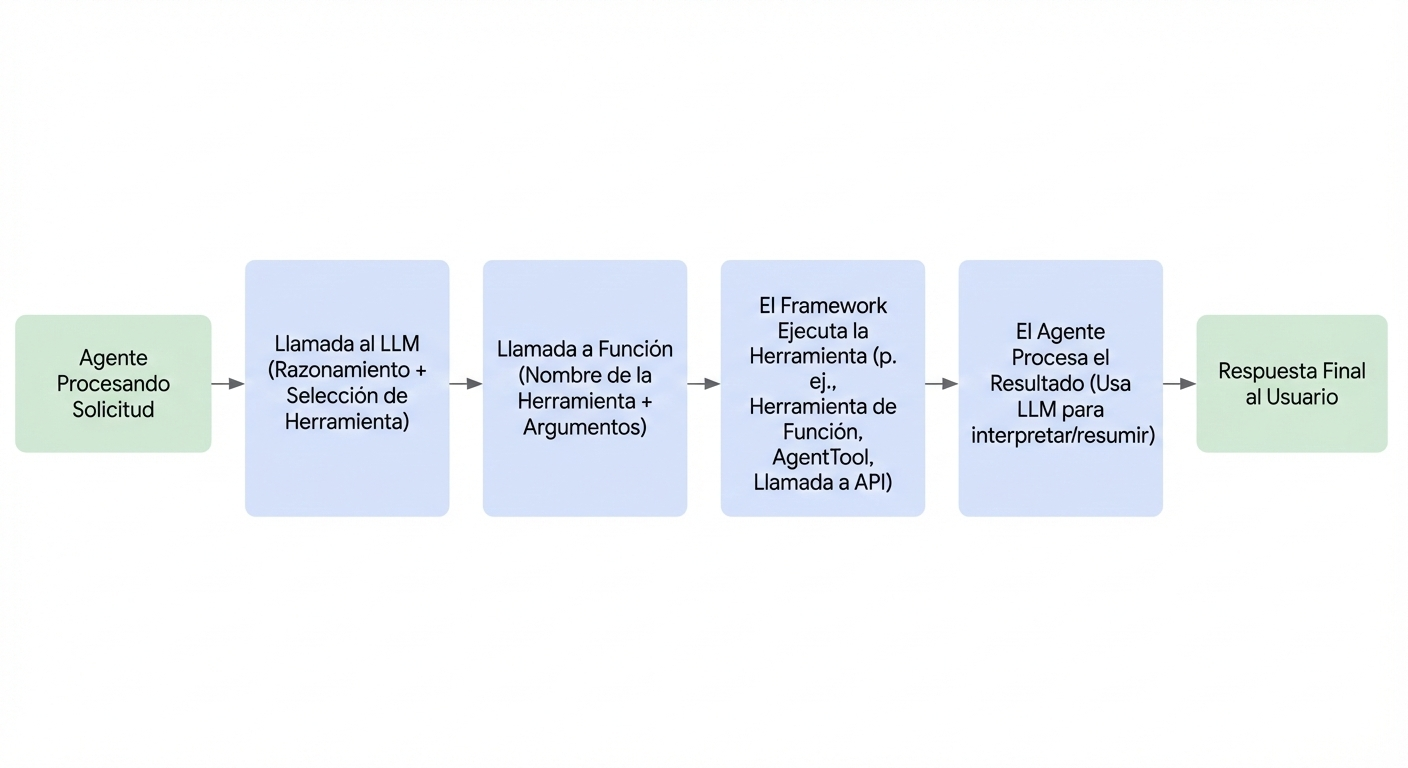
Los agentes aprovechan las herramientas dinámicamente a través de mecanismos que a menudo involucran llamadas de función. El proceso generalmente sigue estos pasos:
- Razonamiento: El LLM del agente analiza su instrucción del sistema, historial de conversación y solicitud del usuario.
- Selección: Basándose en el análisis, el LLM decide qué herramienta, si alguna, ejecutar, basándose en las herramientas disponibles para el agente y los docstrings que describen cada herramienta.
- Invocación: El LLM genera los argumentos requeridos (entradas) para la herramienta seleccionada y activa su ejecución.
- Observación: El agente recibe la salida (resultado) devuelta por la herramienta.
- Finalización: El agente incorpora la salida de la herramienta en su proceso de razonamiento continuo para formular la próxima respuesta, decidir el paso subsecuente o determinar si se ha logrado el objetivo.
Piensa en las herramientas como un kit de herramientas especializado al que el núcleo inteligente del agente (el LLM) puede acceder y utilizar según sea necesario para lograr tareas complejas.
Tipos de Herramientas en ADK
ADK ofrece flexibilidad al soportar varios tipos de herramientas:
- Herramientas de Función: Herramientas creadas por ti, adaptadas a las necesidades específicas de tu aplicación.
- Funciones/Métodos: Define funciones o métodos síncronos estándar en tu código (ej., Python def).
- Agentes-como-Herramientas: Usa otro agente, potencialmente especializado, como una herramienta para un agente padre.
- Herramientas de Función de Larga Duración: Soporte para herramientas que realizan operaciones asíncronas o toman tiempo significativo para completarse.
- Herramientas Integradas: Herramientas listas para usar proporcionadas por el framework para tareas comunes. Ejemplos: Búsqueda de Google, Ejecución de Código, Generación Aumentada por Recuperación (RAG).
- Herramientas de Terceros: Integra herramientas sin problemas desde bibliotecas externas populares.
Navega a las respectivas páginas de documentación enlazadas arriba para información detallada y ejemplos para cada tipo de herramienta.
Referenciar Herramientas en las Instrucciones del Agente
Dentro de las instrucciones de un agente, puedes referenciar directamente una herramienta usando su nombre de función. Si el nombre de función y el docstring de la herramienta son suficientemente descriptivos, tus instrucciones pueden enfocarse principalmente en cuándo el Modelo de Lenguaje Grande (LLM) debe utilizar la herramienta. Esto promueve claridad y ayuda al modelo a entender el uso pretendido de cada herramienta.
Es crucial instruir claramente al agente sobre cómo manejar diferentes valores de retorno que una herramienta puede producir. Por ejemplo, si una herramienta devuelve un mensaje de error, tus instrucciones deben especificar si el agente debe reintentar la operación, abandonar la tarea o solicitar información adicional del usuario.
Además, ADK soporta el uso secuencial de herramientas, donde la salida de una herramienta puede servir como entrada para otra. Al implementar tales flujos de trabajo, es importante describir la secuencia pretendida del uso de herramientas dentro de las instrucciones del agente para guiar al modelo a través de los pasos necesarios.
Ejemplo
El siguiente ejemplo muestra cómo un agente puede usar herramientas referenciando sus nombres de función en sus instrucciones. También demuestra cómo guiar al agente para manejar diferentes valores de retorno de las herramientas, como mensajes de éxito o error, y cómo orquestar el uso secuencial de múltiples herramientas para lograr una tarea.
# Copyright 2025 Google LLC
#
# Licensed under the Apache License, Version 2.0 (the "License");
# you may not use this file except in compliance with the License.
# You may obtain a copy of the License at
#
#     http://www.apache.org/licenses/LICENSE-2.0
#
# Unless required by applicable law or agreed to in writing, software
# distributed under the License is distributed on an "AS IS" BASIS,
# WITHOUT WARRANTIES OR CONDITIONS OF ANY KIND, either express or implied.
# See the License for the specific language governing permissions and
# limitations under the License.

import asyncio
from google.adk.agents import Agent
from google.adk.tools import FunctionTool
from google.adk.runners import Runner
from google.adk.sessions import InMemorySessionService
from google.genai import types

APP_NAME="weather_sentiment_agent"
USER_ID="user1234"
SESSION_ID="1234"
MODEL_ID="gemini-2.0-flash"

# Tool 1
def get_weather_report(city: str) -> dict:
    """Retrieves the current weather report for a specified city.

    Returns:
        dict: A dictionary containing the weather information with a 'status' key ('success' or 'error') and a 'report' key with the weather details if successful, or an 'error_message' if an error occurred.
    """
    if city.lower() == "london":
        return {"status": "success", "report": "The current weather in London is cloudy with a temperature of 18 degrees Celsius and a chance of rain."}
    elif city.lower() == "paris":
        return {"status": "success", "report": "The weather in Paris is sunny with a temperature of 25 degrees Celsius."}
    else:
        return {"status": "error", "error_message": f"Weather information for '{city}' is not available."}

weather_tool = FunctionTool(func=get_weather_report)


# Tool 2
def analyze_sentiment(text: str) -> dict:
    """Analyzes the sentiment of the given text.

    Returns:
        dict: A dictionary with 'sentiment' ('positive', 'negative', or 'neutral') and a 'confidence' score.
    """
    if "good" in text.lower() or "sunny" in text.lower():
        return {"sentiment": "positive", "confidence": 0.8}
    elif "rain" in text.lower() or "bad" in text.lower():
        return {"sentiment": "negative", "confidence": 0.7}
    else:
        return {"sentiment": "neutral", "confidence": 0.6}

sentiment_tool = FunctionTool(func=analyze_sentiment)


# Agent
weather_sentiment_agent = Agent(
    model=MODEL_ID,
    name='weather_sentiment_agent',
    instruction="""You are a helpful assistant that provides weather information and analyzes the sentiment of user feedback.
**If the user asks about the weather in a specific city, use the 'get_weather_report' tool to retrieve the weather details.**
**If the 'get_weather_report' tool returns a 'success' status, provide the weather report to the user.**
**If the 'get_weather_report' tool returns an 'error' status, inform the user that the weather information for the specified city is not available and ask if they have another city in mind.**
**After providing a weather report, if the user gives feedback on the weather (e.g., 'That's good' or 'I don't like rain'), use the 'analyze_sentiment' tool to understand their sentiment.** Then, briefly acknowledge their sentiment.
You can handle these tasks sequentially if needed.""",
    tools=[weather_tool, sentiment_tool]
)

async def main():
    """Main function to run the agent asynchronously."""
    # Session and Runner Setup
    session_service = InMemorySessionService()
    # Use 'await' to correctly create the session
    await session_service.create_session(app_name=APP_NAME, user_id=USER_ID, session_id=SESSION_ID)

    runner = Runner(agent=weather_sentiment_agent, app_name=APP_NAME, session_service=session_service)

    # Agent Interaction
    query = "weather in london?"
    print(f"User Query: {query}")
    content = types.Content(role='user', parts=[types.Part(text=query)])

    # The runner's run method handles the async loop internally
    events = runner.run(user_id=USER_ID, session_id=SESSION_ID, new_message=content)

    for event in events:
        if event.is_final_response():
            final_response = event.content.parts[0].text
            print("Agent Response:", final_response)

# Standard way to run the main async function
if __name__ == "__main__":
    asyncio.run(main())
/**
 * Copyright 2025 Google LLC
 *
 * Licensed under the Apache License, Version 2.0 (the "License");
 * you may not use this file except in compliance with the License.
 * You may obtain a copy of the License at
 *
 *     http://www.apache.org/licenses/LICENSE-2.0
 *
 * Unless required by applicable law or agreed to in writing, software
 * distributed under the License is distributed on an "AS IS" BASIS,
 * WITHOUT WARRANTIES OR CONDITIONS OF ANY KIND, either express or implied.
 * See the License for the specific language governing permissions and
 * limitations under the License.
 */
import { LlmAgent, FunctionTool, InMemoryRunner, isFinalResponse, stringifyContent } from "@google/adk";
import { z } from "zod";
import { Content, createUserContent } from "@google/genai";

/**
 * Retrieves the current weather report for a specified city.
 */
function getWeatherReport(params: { city: string }): Record<string, any> {
    if (params.city.toLowerCase().includes("london")) {
        return {
            "status": "success",
            "report": "The current weather in London is cloudy with a " +
                "temperature of 18 degrees Celsius and a chance of rain.",
        };
    }
    if (params.city.toLowerCase().includes("paris")) {
        return {
            "status": "success",
            "report": "The weather in Paris is sunny with a temperature of 25 " +
                "degrees Celsius.",
        };
    }
    return {
        "status": "error",
        "error_message": `Weather information for '${params.city}' is not available.`,
    };
}

/**
 * Analyzes the sentiment of a given text.
 */
function analyzeSentiment(params: { text: string }): Record<string, any> {
    if (params.text.includes("cloudy") || params.text.includes("rain")) {
        return { "status": "success", "sentiment": "negative" };
    }
    if (params.text.includes("sunny")) {
        return { "status": "success", "sentiment": "positive" };
    }
    return { "status": "success", "sentiment": "neutral" };
}

const weatherTool = new FunctionTool({
    name: "get_weather_report",
    description: "Retrieves the current weather report for a specified city.",
    parameters: z.object({
        city: z.string().describe("The city to get the weather for."),
    }),
    execute: getWeatherReport,
});

const sentimentTool = new FunctionTool({
    name: "analyze_sentiment",
    description: "Analyzes the sentiment of a given text.",
    parameters: z.object({
        text: z.string().describe("The text to analyze the sentiment of."),
    }),
    execute: analyzeSentiment,
});

const instruction = `
    You are a helpful assistant that first checks the weather and then analyzes
    its sentiment.

    Follow these steps:
    1. Use the 'get_weather_report' tool to get the weather for the requested
       city.
    2. If the 'get_weather_report' tool returns an error, inform the user about
       the error and stop.
    3. If the weather report is available, use the 'analyze_sentiment' tool to
       determine the sentiment of the weather report.
    4. Finally, provide a summary to the user, including the weather report and
       its sentiment.
    `;

const agent = new LlmAgent({
    name: "weather_sentiment_agent",
    instruction: instruction,
    tools: [weatherTool, sentimentTool],
    model: "gemini-2.5-flash"
});

async function main() {

    const runner = new InMemoryRunner({ agent: agent, appName: "weather_sentiment_app" });

    await runner.sessionService.createSession({
        appName: "weather_sentiment_app",
        userId: "user1",
        sessionId: "session1"
    });

    const newMessage: Content = createUserContent("What is the weather in London?");

    for await (const event of runner.runAsync({
        userId: "user1",
        sessionId: "session1",
        newMessage: newMessage,
    })) {
        if (isFinalResponse(event) && event.content?.parts?.length) {
            const text = stringifyContent(event).trim();
            if (text) {
                console.log(text);
            }
        }
    }
}

main();
// Copyright 2025 Google LLC
//
// Licensed under the Apache License, Version 2.0 (the "License");
// you may not use this file except in compliance with the License.
// You may obtain a copy of the License at
//
//     http://www.apache.org/licenses/LICENSE-2.0
//
// Unless required by applicable law or agreed to in writing, software
// distributed under the License is distributed on an "AS IS" BASIS,
// WITHOUT WARRANTIES OR CONDITIONS OF ANY KIND, either express or implied.
// See the License for the specific language governing permissions and
// limitations under the License.

package main

import (
    "context"
    "fmt"
    "log"
    "strings"

    "google.golang.org/adk/agent"
    "google.golang.org/adk/agent/llmagent"
    "google.golang.org/adk/model/gemini"
    "google.golang.org/adk/runner"
    "google.golang.org/adk/session"
    "google.golang.org/adk/tool"
    "google.golang.org/adk/tool/functiontool"
    "google.golang.org/genai"
)

type getWeatherReportArgs struct {
    City string `json:"city" jsonschema:"The city for which to get the weather report."`
}

type getWeatherReportResult struct {
    Status string `json:"status"`
    Report string `json:"report,omitempty"`
}

func getWeatherReport(ctx tool.Context, args getWeatherReportArgs) (getWeatherReportResult, error) {
    if strings.ToLower(args.City) == "london" {
        return getWeatherReportResult{Status: "success", Report: "The current weather in London is cloudy with a temperature of 18 degrees Celsius and a chance of rain."}, nil
    }
    if strings.ToLower(args.City) == "paris" {
        return getWeatherReportResult{Status: "success", Report: "The weather in Paris is sunny with a temperature of 25 degrees Celsius."}, nil
    }
    return getWeatherReportResult{}, fmt.Errorf("weather information for '%s' is not available.", args.City)
}

type analyzeSentimentArgs struct {
    Text string `json:"text" jsonschema:"The text to analyze for sentiment."`
}

type analyzeSentimentResult struct {
    Sentiment  string  `json:"sentiment"`
    Confidence float64 `json:"confidence"`
}

func analyzeSentiment(ctx tool.Context, args analyzeSentimentArgs) (analyzeSentimentResult, error) {
    if strings.Contains(strings.ToLower(args.Text), "good") || strings.Contains(strings.ToLower(args.Text), "sunny") {
        return analyzeSentimentResult{Sentiment: "positive", Confidence: 0.8}, nil
    }
    if strings.Contains(strings.ToLower(args.Text), "rain") || strings.Contains(strings.ToLower(args.Text), "bad") {
        return analyzeSentimentResult{Sentiment: "negative", Confidence: 0.7}, nil
    }
    return analyzeSentimentResult{Sentiment: "neutral", Confidence: 0.6}, nil
}

func main() {
    ctx := context.Background()
    model, err := gemini.NewModel(ctx, "gemini-2.0-flash", &genai.ClientConfig{})
    if err != nil {
        log.Fatal(err)
    }

    weatherTool, err := functiontool.New(
        functiontool.Config{
            Name:        "get_weather_report",
            Description: "Retrieves the current weather report for a specified city.",
        },
        getWeatherReport,
    )
    if err != nil {
        log.Fatal(err)
    }

    sentimentTool, err := functiontool.New(
        functiontool.Config{
            Name:        "analyze_sentiment",
            Description: "Analyzes the sentiment of the given text.",
        },
        analyzeSentiment,
    )
    if err != nil {
        log.Fatal(err)
    }

    weatherSentimentAgent, err := llmagent.New(llmagent.Config{
        Name:        "weather_sentiment_agent",
        Model:       model,
        Instruction: "You are a helpful assistant that provides weather information and analyzes the sentiment of user feedback. **If the user asks about the weather in a specific city, use the 'get_weather_report' tool to retrieve the weather details.** **If the 'get_weather_report' tool returns a 'success' status, provide the weather report to the user.** **If the 'get_weather_report' tool returns an 'error' status, inform the user that the weather information for the specified city is not available and ask if they have another city in mind.** **After providing a weather report, if the user gives feedback on the weather (e.g., 'That's good' or 'I don't like rain'), use the 'analyze_sentiment' tool to understand their sentiment.** Then, briefly acknowledge their sentiment. You can handle these tasks sequentially if needed.",
        Tools:       []tool.Tool{weatherTool, sentimentTool},
    })
    if err != nil {
        log.Fatal(err)
    }

    sessionService := session.InMemoryService()
    runner, err := runner.New(runner.Config{
        AppName:        "weather_sentiment_agent",
        Agent:          weatherSentimentAgent,
        SessionService: sessionService,
    })
    if err != nil {
        log.Fatal(err)
    }

    session, err := sessionService.Create(ctx, &session.CreateRequest{
        AppName: "weather_sentiment_agent",
        UserID:  "user1234",
    })
    if err != nil {
        log.Fatal(err)
    }

    run(ctx, runner, session.Session.ID(), "weather in london?")
    run(ctx, runner, session.Session.ID(), "I don't like rain.")
}

func run(ctx context.Context, r *runner.Runner, sessionID string, prompt string) {
    fmt.Printf("\n> %s\n", prompt)
    events := r.Run(
        ctx,
        "user1234",
        sessionID,
        genai.NewContentFromText(prompt, genai.RoleUser),
        agent.RunConfig{
            StreamingMode: agent.StreamingModeNone,
        },
    )
    for event, err := range events {
        if err != nil {
            log.Fatalf("ERROR during agent execution: %v", err)
        }

        if event.Content.Parts[0].Text != "" {
            fmt.Printf("Agent Response: %s\n", event.Content.Parts[0].Text)
        }
    }
}
import com.google.adk.agents.BaseAgent;
import com.google.adk.agents.LlmAgent;
import com.google.adk.runner.Runner;
import com.google.adk.sessions.InMemorySessionService;
import com.google.adk.sessions.Session;
import com.google.adk.tools.Annotations.Schema;
import com.google.adk.tools.FunctionTool;
import com.google.adk.tools.ToolContext; // Ensure this import is correct
import com.google.common.collect.ImmutableList;
import com.google.genai.types.Content;
import com.google.genai.types.Part;
import java.util.HashMap;
import java.util.Locale;
import java.util.Map;

public class WeatherSentimentAgentApp {

  private static final String APP_NAME = "weather_sentiment_agent";
  private static final String USER_ID = "user1234";
  private static final String SESSION_ID = "1234";
  private static final String MODEL_ID = "gemini-2.0-flash";

  /**
   * Retrieves the current weather report for a specified city.
   *
   * @param city The city for which to retrieve the weather report.
   * @param toolContext The context for the tool.
   * @return A dictionary containing the weather information.
   */
  public static Map<String, Object> getWeatherReport(
      @Schema(name = "city")
      String city,
      @Schema(name = "toolContext")
      ToolContext toolContext) {
    Map<String, Object> response = new HashMap<>();

    if (city.toLowerCase(Locale.ROOT).equals("london")) {
      response.put("status", "success");
      response.put(
          "report",
          "The current weather in London is cloudy with a temperature of 18 degrees Celsius and a"
              + " chance of rain.");
    } else if (city.toLowerCase(Locale.ROOT).equals("paris")) {
      response.put("status", "success");
      response.put(
          "report", "The weather in Paris is sunny with a temperature of 25 degrees Celsius.");
    } else {
      response.put("status", "error");
      response.put(
          "error_message", String.format("Weather information for '%s' is not available.", city));
    }
    return response;
  }

  /**
   * Analyzes the sentiment of the given text.
   *
   * @param text The text to analyze.
   * @param toolContext The context for the tool.
   * @return A dictionary with sentiment and confidence score.
   */
  public static Map<String, Object> analyzeSentiment(
      @Schema(name = "text")
      String text,
      @Schema(name = "toolContext")
      ToolContext toolContext) {
    Map<String, Object> response = new HashMap<>();
    String lowerText = text.toLowerCase(Locale.ROOT);
    if (lowerText.contains("good") || lowerText.contains("sunny")) {
      response.put("sentiment", "positive");
      response.put("confidence", 0.8);
    } else if (lowerText.contains("rain") || lowerText.contains("bad")) {
      response.put("sentiment", "negative");
      response.put("confidence", 0.7);
    } else {
      response.put("sentiment", "neutral");
      response.put("confidence", 0.6);
    }
    return response;
  }

  /**
   * Calls the agent with the given query and prints the final response.
   *
   * @param runner The runner to use.
   * @param query The query to send to the agent.
   */
  public static void callAgent(Runner runner, String query) {
    Content content = Content.fromParts(Part.fromText(query));

    InMemorySessionService sessionService = (InMemorySessionService) runner.sessionService();
    Session session =
        sessionService
            .createSession(APP_NAME, USER_ID, /* state= */ null, SESSION_ID)
            .blockingGet();

    runner
        .runAsync(session.userId(), session.id(), content)
        .forEach(
            event -> {
              if (event.finalResponse()
                  && event.content().isPresent()
                  && event.content().get().parts().isPresent()
                  && !event.content().get().parts().get().isEmpty()
                  && event.content().get().parts().get().get(0).text().isPresent()) {
                String finalResponse = event.content().get().parts().get().get(0).text().get();
                System.out.println("Agent Response: " + finalResponse);
              }
            });
  }

  public static void main(String[] args) throws NoSuchMethodException {
    FunctionTool weatherTool =
        FunctionTool.create(
            WeatherSentimentAgentApp.class.getMethod(
                "getWeatherReport", String.class, ToolContext.class));
    FunctionTool sentimentTool =
        FunctionTool.create(
            WeatherSentimentAgentApp.class.getMethod(
                "analyzeSentiment", String.class, ToolContext.class));

    BaseAgent weatherSentimentAgent =
        LlmAgent.builder()
            .model(MODEL_ID)
            .name("weather_sentiment_agent")
            .description("Weather Sentiment Agent")
            .instruction("""
                    You are a helpful assistant that provides weather information and analyzes the
                    sentiment of user feedback
                    **If the user asks about the weather in a specific city, use the
                    'get_weather_report' tool to retrieve the weather details.**
                    **If the 'get_weather_report' tool returns a 'success' status, provide the
                    weather report to the user.**
                    **If the 'get_weather_report' tool returns an 'error' status, inform the
                    user that the weather information for the specified city is not available
                    and ask if they have another city in mind.**
                    **After providing a weather report, if the user gives feedback on the
                    weather (e.g., 'That's good' or 'I don't like rain'), use the
                    'analyze_sentiment' tool to understand their sentiment.** Then, briefly
                    acknowledge their sentiment.
                    You can handle these tasks sequentially if needed.
                    """)
            .tools(ImmutableList.of(weatherTool, sentimentTool))
            .build();

    InMemorySessionService sessionService = new InMemorySessionService();
    Runner runner = new Runner(weatherSentimentAgent, APP_NAME, null, sessionService);

    // Change the query to ensure the tool is called with a valid city that triggers a "success"
    // response from the tool, like "london" (without the question mark).
    callAgent(runner, "weather in paris");
  }
}
Contexto de Herramienta
Para escenarios más avanzados, ADK te permite acceder a información contextual adicional dentro de tu función de herramienta incluyendo el parámetro especial tool_context: ToolContext. Al incluir esto en la firma de la función, ADK automáticamente proporcionará una instancia de la clase ToolContext cuando tu herramienta sea llamada durante la ejecución del agente.
El ToolContext proporciona acceso a varias piezas clave de información y palancas de control:
-
state: State: Lee y modifica el estado de la sesión actual. Los cambios realizados aquí son rastreados y persistidos. -
actions: EventActions: Influye en las acciones subsecuentes del agente después de que la herramienta se ejecuta (ej., omitir resumen, transferir a otro agente). -
function_call_id: str: El identificador único asignado por el framework a esta invocación específica de la herramienta. Útil para rastrear y correlacionar con respuestas de autenticación. Esto también puede ser útil cuando múltiples herramientas son llamadas dentro de una sola respuesta del modelo. -
function_call_event_id: str: Este atributo proporciona el identificador único del evento que activó la llamada de herramienta actual. Esto puede ser útil para propósitos de rastreo y registro. -
auth_response: Any: Contiene la respuesta/credenciales de autenticación si un flujo de autenticación fue completado antes de esta llamada de herramienta. -
Acceso a Servicios: Métodos para interactuar con servicios configurados como Artifacts y Memory.
Nota que no debes incluir el parámetro tool_context en el docstring de la función de herramienta. Dado que ToolContext es automáticamente inyectado por el framework ADK después de que el LLM decide llamar a la función de herramienta, no es relevante para la toma de decisiones del LLM e incluirlo puede confundir al LLM.
Gestión de Estado
El atributo tool_context.state proporciona acceso directo de lectura y escritura al estado asociado con la sesión actual. Se comporta como un diccionario pero asegura que cualquier modificación sea rastreada como deltas y persistida por el servicio de sesión. Esto permite a las herramientas mantener y compartir información a través de diferentes interacciones y pasos del agente.
-
Leer Estado: Usa acceso de diccionario estándar (
tool_context.state['my_key']) o el método.get()(tool_context.state.get('my_key', default_value)). -
Escribir Estado: Asigna valores directamente (
tool_context.state['new_key'] = 'new_value'). Estos cambios son registrados en el state_delta del evento resultante. -
Prefijos de Estado: Recuerda los prefijos de estado estándar:
-
app:*: Compartido a través de todos los usuarios de la aplicación. -
user:*: Específico al usuario actual a través de todas sus sesiones. -
(Sin prefijo): Específico a la sesión actual.
-
temp:*: Temporal, no persistido a través de invocaciones (útil para pasar datos dentro de una sola llamada de ejecución pero generalmente menos útil dentro de un contexto de herramienta que opera entre llamadas LLM).
-
from google.adk.tools import ToolContext, FunctionTool

def update_user_preference(preference: str, value: str, tool_context: ToolContext):
    """Updates a user-specific preference."""
    user_prefs_key = "user:preferences"
    # Get current preferences or initialize if none exist
    preferences = tool_context.state.get(user_prefs_key, {})
    preferences[preference] = value
    # Write the updated dictionary back to the state
    tool_context.state[user_prefs_key] = preferences
    print(f"Tool: Updated user preference '{preference}' to '{value}'")
    return {"status": "success", "updated_preference": preference}

pref_tool = FunctionTool(func=update_user_preference)

# In an Agent:
# my_agent = Agent(..., tools=[pref_tool])

# When the LLM calls update_user_preference(preference='theme', value='dark', ...):
# The tool_context.state will be updated, and the change will be part of the
# resulting tool response event's actions.state_delta.
import { ToolContext } from "@google/adk";

// Updates a user-specific preference.
export function updateUserThemePreference(
  value: string,
  toolContext: ToolContext
): Record<string, any> {
  const userPrefsKey = "user:preferences";

  // Get current preferences or initialize if none exist
  const preferences = toolContext.state.get(userPrefsKey, {}) as Record<string, any>;
  preferences["theme"] = value;

  // Write the updated dictionary back to the state
  toolContext.state.set(userPrefsKey, preferences);
  console.log(
    `Tool: Updated user preference ${userPrefsKey} to ${JSON.stringify(toolContext.state.get(userPrefsKey))}`
  );

  return {
    status: "success",
    updated_preference: toolContext.state.get(userPrefsKey),
  };
  // When the LLM calls updateUserThemePreference("dark"):
  // The toolContext.state will be updated, and the change will be part of the
  // resulting tool response event's actions.stateDelta.
}
import (
    "fmt"

    "google.golang.org/adk/tool"
)

type updateUserPreferenceArgs struct {
    Preference string `json:"preference" jsonschema:"The name of the preference to set."`
    Value      string `json:"value" jsonschema:"The value to set for the preference."`
}

type updateUserPreferenceResult struct {
    UpdatedPreference string `json:"updated_preference"`
}

func updateUserPreference(ctx tool.Context, args updateUserPreferenceArgs) (*updateUserPreferenceResult, error) {
    userPrefsKey := "user:preferences"
    val, err := ctx.State().Get(userPrefsKey)
    if err != nil {
        val = make(map[string]any)
    }

    preferencesMap, ok := val.(map[string]any)
    if !ok {
        preferencesMap = make(map[string]any)
    }

    preferencesMap[args.Preference] = args.Value

    if err := ctx.State().Set(userPrefsKey, preferencesMap); err != nil {
        return nil, err
    }

    fmt.Printf("Tool: Updated user preference '%s' to '%s'\n", args.Preference, args.Value)
    return &updateUserPreferenceResult{
        UpdatedPreference: args.Preference,
    }, nil
}
import com.google.adk.tools.FunctionTool;
import com.google.adk.tools.ToolContext;

// Actualiza una preferencia específica del usuario.
public Map<String, String> updateUserThemePreference(String value, ToolContext toolContext) {
  String userPrefsKey = "user:preferences:theme";

  // Obtiene las preferencias actuales o inicializa si no existen
  String preference = toolContext.state().getOrDefault(userPrefsKey, "").toString();
  if (preference.isEmpty()) {
    preference = value;
  }

  // Escribe el diccionario actualizado de vuelta al estado
  toolContext.state().put("user:preferences", preference);
  System.out.printf("Tool: Updated user preference %s to %s", userPrefsKey, preference);

  return Map.of("status", "success", "updated_preference", toolContext.state().get(userPrefsKey).toString());
  // Cuando el LLM llama a updateUserThemePreference("dark"):
  // El toolContext.state será actualizado, y el cambio será parte del
  // actions.stateDelta del evento de respuesta de herramienta resultante.
}
Controlando el Flujo del Agente
El atributo tool_context.actions en Python y TypeScript, ToolContext.actions() en Java, y tool.Context.Actions() en Go, contiene un objeto EventActions. Modificar atributos en este objeto permite a tu herramienta influir en lo que el agente o framework hace después de que la herramienta termina su ejecución.
-
skip_summarization: bool: (Por defecto: False) Si se establece en True, instruye al ADK a omitir la llamada LLM que típicamente resume la salida de la herramienta. Esto es útil si el valor de retorno de tu herramienta ya es un mensaje listo para el usuario. -
transfer_to_agent: str: Establece esto al nombre de otro agente. El framework detendrá la ejecución del agente actual y transferirá el control de la conversación al agente especificado. Esto permite a las herramientas entregar dinámicamente tareas a agentes más especializados. -
escalate: bool: (Por defecto: False) Establecer esto en True señala que el agente actual no puede manejar la solicitud y debe pasar el control a su agente padre (si está en una jerarquía). En un LoopAgent, establecer escalate=True en la herramienta de un sub-agente terminará el bucle.
Ejemplo
# Copyright 2025 Google LLC
#
# Licensed under the Apache License, Version 2.0 (the "License");
# you may not use this file except in compliance with the License.
# You may obtain a copy of the License at
#
#     http://www.apache.org/licenses/LICENSE-2.0
#
# Unless required by applicable law or agreed to in writing, software
# distributed under the License is distributed on an "AS IS" BASIS,
# WITHOUT WARRANTIES OR CONDITIONS OF ANY KIND, either express or implied.
# See the License for the specific language governing permissions and
# limitations under the License.

from google.adk.agents import Agent
from google.adk.tools import FunctionTool
from google.adk.runners import Runner
from google.adk.sessions import InMemorySessionService
from google.adk.tools import ToolContext
from google.genai import types

APP_NAME="customer_support_agent"
USER_ID="user1234"
SESSION_ID="1234"


def check_and_transfer(query: str, tool_context: ToolContext) -> str:
    """Checks if the query requires escalation and transfers to another agent if needed."""
    if "urgent" in query.lower():
        print("Tool: Detected urgency, transferring to the support agent.")
        tool_context.actions.transfer_to_agent = "support_agent"
        return "Transferring to the support agent..."
    else:
        return f"Processed query: '{query}'. No further action needed."

escalation_tool = FunctionTool(func=check_and_transfer)

main_agent = Agent(
    model='gemini-2.0-flash',
    name='main_agent',
    instruction="""You are the first point of contact for customer support of an analytics tool. Answer general queries. If the user indicates urgency, use the 'check_and_transfer' tool.""",
    tools=[check_and_transfer]
)

support_agent = Agent(
    model='gemini-2.0-flash',
    name='support_agent',
    instruction="""You are the dedicated support agent. Mentioned you are a support handler and please help the user with their urgent issue."""
)

main_agent.sub_agents = [support_agent]

# Session and Runner
async def setup_session_and_runner():
    session_service = InMemorySessionService()
    session = await session_service.create_session(app_name=APP_NAME, user_id=USER_ID, session_id=SESSION_ID)
    runner = Runner(agent=main_agent, app_name=APP_NAME, session_service=session_service)
    return session, runner

# Agent Interaction
async def call_agent_async(query):
    content = types.Content(role='user', parts=[types.Part(text=query)])
    session, runner = await setup_session_and_runner()
    events = runner.run_async(user_id=USER_ID, session_id=SESSION_ID, new_message=content)

    async for event in events:
        if event.is_final_response():
            final_response = event.content.parts[0].text
            print("Agent Response: ", final_response)

# Note: In Colab, you can directly use 'await' at the top level.
# If running this code as a standalone Python script, you'll need to use asyncio.run() or manage the event loop.
await call_agent_async("this is urgent, i cant login")
/**
 * Copyright 2025 Google LLC
 *
 * Licensed under the Apache License, Version 2.0 (the "License");
 * you may not use this file except in compliance with the License.
 * You may obtain a copy of the License at
 *
 *     http://www.apache.org/licenses/LICENSE-2.0
 *
 * Unless required by applicable law or agreed to in writing, software
 * distributed under the License is distributed on an "AS IS" BASIS,
 * WITHOUT WARRANTIES OR CONDITIONS OF ANY KIND, either express or implied.
 * See the License for the specific language governing permissions and
 * limitations under the License.
 */
import { LlmAgent, FunctionTool, ToolContext, InMemoryRunner, isFinalResponse, stringifyContent } from "@google/adk";
import { z } from "zod";
import { Content, createUserContent } from "@google/genai";

function checkAndTransfer(
  params: { query: string },
  toolContext?: ToolContext
): Record<string, any> {
  if (!toolContext) {
    // This should not happen in a normal ADK flow where the tool is called by an agent.
    throw new Error("ToolContext is required to transfer agents.");
  }
  if (params.query.toLowerCase().includes("urgent")) {
    console.log("Tool: Urgent query detected, transferring to support_agent.");
    toolContext.actions.transferToAgent = "support_agent";
    return { status: "success", message: "Transferring to support agent." };
  }

  console.log("Tool: Query is not urgent, handling normally.");
  return { status: "success", message: "Query will be handled by the main agent." };
}

const transferTool = new FunctionTool({
  name: "check_and_transfer",
  description: "Checks the user's query and transfers to a support agent if urgent.",
  parameters: z.object({
    query: z.string().describe("The user query to analyze."),
  }),
  execute: checkAndTransfer,
});

const supportAgent = new LlmAgent({
  name: "support_agent",
  description: "Handles urgent user requests about accounts.",
  instruction: "You are the support agent. Handle the user's urgent request.",
  model: "gemini-2.5-flash"
});

const mainAgent = new LlmAgent({
  name: "main_agent",
  description: "The main agent that routes non-urgent queries.",
  instruction: "You are the main agent. Use the check_and_transfer tool to analyze the user query. If the query is not urgent, handle it yourself.",
  tools: [transferTool],
  subAgents: [supportAgent],
  model: "gemini-2.5-flash"
});

async function main() {
  const runner = new InMemoryRunner({ agent: mainAgent, appName: "customer_support_app" });

  console.log("--- Running with a non-urgent query ---");
  await runner.sessionService.createSession({ appName: "customer_support_app", userId: "user1", sessionId: "session1" });
  const nonUrgentMessage: Content = createUserContent("I have a general question about my account.");
  for await (const event of runner.runAsync({ userId: "user1", sessionId: "session1", newMessage: nonUrgentMessage })) {
    if (isFinalResponse(event) && event.content?.parts?.length) {
      const text = stringifyContent(event).trim();
      if (text) {
        console.log(`Final Response: ${text}`);
      }
    }
  }

  console.log("\n--- Running with an urgent query ---");
  await runner.sessionService.createSession({ appName: "customer_support_app", userId: "user1", sessionId: "session2" });
  const urgentMessage: Content = createUserContent("My account is locked and this is urgent!");
  for await (const event of runner.runAsync({ userId: "user1", sessionId: "session2", newMessage: urgentMessage })) {
    if (isFinalResponse(event) && event.content?.parts?.length) {
      const text = stringifyContent(event).trim();
      if (text) {
        console.log(`Final Response: ${text}`);
      }
    }
  }
}

main();
// Copyright 2025 Google LLC
//
// Licensed under the Apache License, Version 2.0 (the "License");
// you may not use this file except in compliance with the License.
// You may obtain a copy of the License at
//
//     http://www.apache.org/licenses/LICENSE-2.0
//
// Unless required by applicable law or agreed to in writing, software
// distributed under the License is distributed on an "AS IS" BASIS,
// WITHOUT WARRANTIES OR CONDITIONS OF ANY KIND, either express or implied.
// See the License for the specific language governing permissions and
// limitations under the License.

package main

import (
    "context"
    "fmt"
    "log"
    "strings"

    "google.golang.org/adk/agent"
    "google.golang.org/adk/agent/llmagent"
    "google.golang.org/adk/model/gemini"
    "google.golang.org/adk/runner"
    "google.golang.org/adk/session"
    "google.golang.org/adk/tool"
    "google.golang.org/adk/tool/functiontool"
    "google.golang.org/genai"
)

type checkAndTransferArgs struct {
    Query string `json:"query" jsonschema:"The user's query to check for urgency."`
}

type checkAndTransferResult struct {
    Status string `json:"status"`
}

func checkAndTransfer(ctx tool.Context, args checkAndTransferArgs) (checkAndTransferResult, error) {
    if strings.Contains(strings.ToLower(args.Query), "urgent") {
        fmt.Println("Tool: Detected urgency, transferring to the support agent.")
        ctx.Actions().TransferToAgent = "support_agent"
        return checkAndTransferResult{Status: "Transferring to the support agent..."}, nil
    }
    return checkAndTransferResult{Status: fmt.Sprintf("Processed query: '%s'. No further action needed.", args.Query)}, nil
}

func main() {
    ctx := context.Background()
    model, err := gemini.NewModel(ctx, "gemini-2.0-flash", &genai.ClientConfig{})
    if err != nil {
        log.Fatal(err)
    }

    supportAgent, err := llmagent.New(llmagent.Config{
        Name:        "support_agent",
        Model:       model,
        Instruction: "You are the dedicated support agent. Mentioned you are a support handler and please help the user with their urgent issue.",
    })
    if err != nil {
        log.Fatal(err)
    }

    checkAndTransferTool, err := functiontool.New(
        functiontool.Config{
            Name:        "check_and_transfer",
            Description: "Checks if the query requires escalation and transfers to another agent if needed.",
        },
        checkAndTransfer,
    )
    if err != nil {
        log.Fatal(err)
    }

    mainAgent, err := llmagent.New(llmagent.Config{
        Name:        "main_agent",
        Model:       model,
        Instruction: "You are the first point of contact for customer support of an analytics tool. Answer general queries. If the user indicates urgency, use the 'check_and_transfer' tool.",
        Tools:       []tool.Tool{checkAndTransferTool},
        SubAgents:   []agent.Agent{supportAgent},
    })
    if err != nil {
        log.Fatal(err)
    }

    sessionService := session.InMemoryService()
    runner, err := runner.New(runner.Config{
        AppName:        "customer_support_agent",
        Agent:          mainAgent,
        SessionService: sessionService,
    })
    if err != nil {
        log.Fatal(err)
    }

    session, err := sessionService.Create(ctx, &session.CreateRequest{
        AppName: "customer_support_agent",
        UserID:  "user1234",
    })
    if err != nil {
        log.Fatal(err)
    }

    run(ctx, runner, session.Session.ID(), "this is urgent, i cant login")
}

func run(ctx context.Context, r *runner.Runner, sessionID string, prompt string) {
    fmt.Printf("\n> %s\n", prompt)
    events := r.Run(
        ctx,
        "user1234",
        sessionID,
        genai.NewContentFromText(prompt, genai.RoleUser),
        agent.RunConfig{
            StreamingMode: agent.StreamingModeNone,
        },
    )
    for event, err := range events {
        if err != nil {
            log.Fatalf("ERROR during agent execution: %v", err)
        }

        if event.Content.Parts[0].Text != "" {
            fmt.Printf("Agent Response: %s\n", event.Content.Parts[0].Text)
        }
    }
}
import com.google.adk.agents.LlmAgent;
import com.google.adk.runner.Runner;
import com.google.adk.sessions.InMemorySessionService;
import com.google.adk.sessions.Session;
import com.google.adk.tools.Annotations.Schema;
import com.google.adk.tools.FunctionTool;
import com.google.adk.tools.ToolContext;
import com.google.common.collect.ImmutableList;
import com.google.genai.types.Content;
import com.google.genai.types.Part;
import java.util.HashMap;
import java.util.Locale;
import java.util.Map;

public class CustomerSupportAgentApp {

  private static final String APP_NAME = "customer_support_agent";
  private static final String USER_ID = "user1234";
  private static final String SESSION_ID = "1234";
  private static final String MODEL_ID = "gemini-2.0-flash";

  /**
   * Checks if the query requires escalation and transfers to another agent if needed.
   *
   * @param query The user's query.
   * @param toolContext The context for the tool.
   * @return A map indicating the result of the check and transfer.
   */
  public static Map<String, Object> checkAndTransfer(
      @Schema(name = "query", description = "the user query")
      String query,
      @Schema(name = "toolContext", description = "the tool context")
      ToolContext toolContext) {
    Map<String, Object> response = new HashMap<>();
    if (query.toLowerCase(Locale.ROOT).contains("urgent")) {
      System.out.println("Tool: Detected urgency, transferring to the support agent.");
      toolContext.actions().setTransferToAgent("support_agent");
      response.put("status", "transferring");
      response.put("message", "Transferring to the support agent...");
    } else {
      response.put("status", "processed");
      response.put(
          "message", String.format("Processed query: '%s'. No further action needed.", query));
    }
    return response;
  }

  /**
   * Calls the agent with the given query and prints the final response.
   *
   * @param runner The runner to use.
   * @param query The query to send to the agent.
   */
  public static void callAgent(Runner runner, String query) {
    Content content =
        Content.fromParts(Part.fromText(query));

    InMemorySessionService sessionService = (InMemorySessionService) runner.sessionService();
    // Fixed: session ID does not need to be an optional.
    Session session =
        sessionService
            .createSession(APP_NAME, USER_ID, /* state= */ null, SESSION_ID)
            .blockingGet();

    runner
        .runAsync(session.userId(), session.id(), content)
        .forEach(
            event -> {
              if (event.finalResponse()
                  && event.content().isPresent()
                  && event.content().get().parts().isPresent()
                  && !event.content().get().parts().get().isEmpty()
                  && event.content().get().parts().get().get(0).text().isPresent()) {
                String finalResponse = event.content().get().parts().get().get(0).text().get();
                System.out.println("Agent Response: " + finalResponse);
              }
            });
  }

  public static void main(String[] args) throws NoSuchMethodException {
    FunctionTool escalationTool =
        FunctionTool.create(
            CustomerSupportAgentApp.class.getMethod(
                "checkAndTransfer", String.class, ToolContext.class));

    LlmAgent supportAgent =
        LlmAgent.builder()
            .model(MODEL_ID)
            .name("support_agent")
            .description("""
                The dedicated support agent.
                Mentions it is a support handler and helps the user with their urgent issue.
            """)
            .instruction("""
                You are the dedicated support agent.
                Mentioned you are a support handler and please help the user with their urgent issue.
            """)
            .build();

    LlmAgent mainAgent =
        LlmAgent.builder()
            .model(MODEL_ID)
            .name("main_agent")
            .description("""
                The first point of contact for customer support of an analytics tool.
                Answers general queries.
                If the user indicates urgency, uses the 'check_and_transfer' tool.
                """)
            .instruction("""
                You are the first point of contact for customer support of an analytics tool.
                Answer general queries.
                If the user indicates urgency, use the 'check_and_transfer' tool.
                """)
            .tools(ImmutableList.of(escalationTool))
            .subAgents(supportAgent)
            .build();
    // Fixed: LlmAgent.subAgents() expects 0 arguments.
    // Sub-agents are now added to the main agent via its builder,
    // as `subAgents` is a property that should be set during agent construction
    // if it's not dynamically managed.

    InMemorySessionService sessionService = new InMemorySessionService();
    Runner runner = new Runner(mainAgent, APP_NAME, null, sessionService);

    // Agent Interaction
    callAgent(runner, "this is urgent, i cant login");
  }
}
Explicación
- Definimos dos agentes:
main_agentysupport_agent. Elmain_agentestá diseñado para ser el punto inicial de contacto. - La herramienta
check_and_transfer, cuando es llamada pormain_agent, examina la consulta del usuario. - Si la consulta contiene la palabra "urgent", la herramienta accede al
tool_context, específicamentetool_context.actions, y establece el atributo transfer_to_agent asupport_agent. - Esta acción señala al framework para transferir el control de la conversación al agente llamado
support_agent. - Cuando el
main_agentprocesa la consulta urgente, la herramientacheck_and_transferactiva la transferencia. La respuesta subsecuente vendría idealmente delsupport_agent. - Para una consulta normal sin urgencia, la herramienta simplemente la procesa sin activar una transferencia.
Este ejemplo ilustra cómo una herramienta, a través de EventActions en su ToolContext, puede influir dinámicamente en el flujo de la conversación transfiriendo el control a otro agente especializado.
Autenticación
ToolContext proporciona mecanismos para herramientas que interactúan con APIs autenticadas. Si tu herramienta necesita manejar autenticación, podrías usar lo siguiente:
-
auth_response(en Python): Contiene credenciales (ej., un token) si la autenticación ya fue manejada por el framework antes de que tu herramienta fuera llamada (común con RestApiTool y esquemas de seguridad OpenAPI). En TypeScript, esto se recupera a través del método getAuthResponse(). -
request_credential(auth_config: dict)(en Python) orequestCredential(authConfig: AuthConfig)(en TypeScript): Llama a este método si tu herramienta determina que se necesita autenticación pero las credenciales no están disponibles. Esto señala al framework para iniciar un flujo de autenticación basado en el auth_config proporcionado. -
get_auth_response()(en Python) ogetAuthResponse(authConfig: AuthConfig)(en TypeScript): Llama a esto en una invocación subsecuente (después de que request_credential fue manejado exitosamente) para recuperar las credenciales que el usuario proporcionó.
Para explicaciones detalladas de flujos de autenticación, configuración y ejemplos, por favor refiérete a la página de documentación dedicada a Autenticación de Herramientas.
Métodos de Acceso a Datos Conscientes del Contexto
Estos métodos proporcionan formas convenientes para que tu herramienta interactúe con datos persistentes asociados con la sesión o usuario, gestionados por servicios configurados.
-
list_artifacts()(en Python) olistArtifacts()(en Java y TypeScript): Devuelve una lista de nombres de archivos (o claves) para todos los artefactos actualmente almacenados para la sesión a través del artifact_service. Los artefactos son típicamente archivos (imágenes, documentos, etc.) cargados por el usuario o generados por herramientas/agentes. -
load_artifact(filename: str): Recupera un artefacto específico por su nombre de archivo del artifact_service. Opcionalmente puedes especificar una versión; si se omite, se devuelve la versión más reciente. Devuelve un objetogoogle.genai.types.Partconteniendo los datos del artefacto y el tipo mime, o None si no se encuentra. -
save_artifact(filename: str, artifact: types.Part): Guarda una nueva versión de un artefacto en el artifact_service. Devuelve el nuevo número de versión (comenzando desde 0). -
search_memory(query: str): (Soporte en ADK Python, Go y TypeScript) Consulta la memoria a largo plazo del usuario usando elmemory_serviceconfigurado. Esto es útil para recuperar información relevante de interacciones pasadas o conocimiento almacenado. La estructura del SearchMemoryResponse depende de la implementación específica del servicio de memoria pero típicamente contiene fragmentos de texto relevantes o extractos de conversación.
Ejemplo
# Copyright 2025 Google LLC
#
# Licensed under the Apache License, Version 2.0 (the "License");
# you may not use this file except in compliance with the License.
# You may obtain a copy of the License at
#
#     http://www.apache.org/licenses/LICENSE-2.0
#
# Unless required by applicable law or agreed to in writing, software
# distributed under the License is distributed on an "AS IS" BASIS,
# WITHOUT WARRANTIES OR CONDITIONS OF ANY KIND, either express or implied.
# See the License for the specific language governing permissions and
# limitations under the License.

from google.adk.tools import ToolContext, FunctionTool
from google.genai import types


def process_document(
    document_name: str, analysis_query: str, tool_context: ToolContext
) -> dict:
    """Analyzes a document using context from memory."""

    # 1. Load the artifact
    print(f"Tool: Attempting to load artifact: {document_name}")
    document_part = tool_context.load_artifact(document_name)

    if not document_part:
        return {"status": "error", "message": f"Document '{document_name}' not found."}

    document_text = document_part.text  # Assuming it's text for simplicity
    print(f"Tool: Loaded document '{document_name}' ({len(document_text)} chars).")

    # 2. Search memory for related context
    print(f"Tool: Searching memory for context related to: '{analysis_query}'")
    memory_response = tool_context.search_memory(
        f"Context for analyzing document about {analysis_query}"
    )
    memory_context = "\n".join(
        [
            m.events[0].content.parts[0].text
            for m in memory_response.memories
            if m.events and m.events[0].content
        ]
    )  # Simplified extraction
    print(f"Tool: Found memory context: {memory_context[:100]}...")

    # 3. Perform analysis (placeholder)
    analysis_result = f"Analysis of '{document_name}' regarding '{analysis_query}' using memory context: [Placeholder Analysis Result]"
    print("Tool: Performed analysis.")

    # 4. Save the analysis result as a new artifact
    analysis_part = types.Part.from_text(text=analysis_result)
    new_artifact_name = f"analysis_{document_name}"
    version = await tool_context.save_artifact(new_artifact_name, analysis_part)
    print(f"Tool: Saved analysis result as '{new_artifact_name}' version {version}.")

    return {
        "status": "success",
        "analysis_artifact": new_artifact_name,
        "version": version,
    }


doc_analysis_tool = FunctionTool(func=process_document)

# In an Agent:
# Assume artifact 'report.txt' was previously saved.
# Assume memory service is configured and has relevant past data.
# my_agent = Agent(..., tools=[doc_analysis_tool], artifact_service=..., memory_service=...)
import { Part } from "@google/genai";
import { ToolContext } from "@google/adk";

// Analyzes a document using context from memory.
export async function processDocument(
  params: { documentName: string; analysisQuery: string },
  toolContext?: ToolContext
): Promise<Record<string, any>> {
  if (!toolContext) {
    throw new Error("ToolContext is required for this tool.");
  }

  // 1. List all available artifacts
  const artifacts = await toolContext.listArtifacts();
  console.log(`Listing all available artifacts: ${artifacts}`);

  // 2. Load an artifact
  console.log(`Tool: Attempting to load artifact: ${params.documentName}`);
  const documentPart = await toolContext.loadArtifact(params.documentName);
  if (!documentPart) {
    console.log(`Tool: Document '${params.documentName}' not found.`);
    return {
      status: "error",
      message: `Document '${params.documentName}' not found.`,
    };
  }

  const documentText = documentPart.text ?? "";
  console.log(
    `Tool: Loaded document '${params.documentName}' (${documentText.length} chars).`
  );

  // 3. Search memory for related context
  console.log(`Tool: Searching memory for context related to '${params.analysisQuery}'`);
  const memory_results = await toolContext.searchMemory(params.analysisQuery);
  console.log(`Tool: Found ${memory_results.memories.length} relevant memories.`);
  const context_from_memory = memory_results.memories
    .map((m) => m.content.parts[0].text)
    .join("\n");

  // 4. Perform analysis (placeholder)
  const analysisResult =
    `Analysis of '${params.documentName}' regarding '${params.analysisQuery}':\n` +
    `Context from Memory:\n${context_from_memory}\n` +
    `[Placeholder Analysis Result]`;
  console.log("Tool: Performed analysis.");

  // 5. Save the analysis result as a new artifact
  const analysisPart: Part = { text: analysisResult };
  const newArtifactName = `analysis_${params.documentName}`;
  await toolContext.saveArtifact(newArtifactName, analysisPart);
  console.log(`Tool: Saved analysis result to '${newArtifactName}'.`);

  return {
    status: "success",
    analysis_artifact: newArtifactName,
  };
}
// Copyright 2025 Google LLC
//
// Licensed under the Apache License, Version 2.0 (the "License");
// you may not use this file except in compliance with the License.
// You may obtain a copy of the License at
//
//     http://www.apache.org/licenses/LICENSE-2.0
//
// Unless required by applicable law or agreed to in writing, software
// distributed under the License is distributed on an "AS IS" BASIS,
// WITHOUT WARRANTIES OR CONDITIONS OF ANY KIND, either express or implied.
// See the License for the specific language governing permissions and
// limitations under the License.

package main

import (
    "fmt"

    "google.golang.org/adk/tool"
    "google.golang.org/genai"
)

type processDocumentArgs struct {
    DocumentName  string `json:"document_name" jsonschema:"The name of the document to be processed."`
    AnalysisQuery string `json:"analysis_query" jsonschema:"The query for the analysis."`
}

type processDocumentResult struct {
    Status           string `json:"status"`
    AnalysisArtifact string `json:"analysis_artifact,omitempty"`
    Version          int64  `json:"version,omitempty"`
    Message          string `json:"message,omitempty"`
}

func processDocument(ctx tool.Context, args processDocumentArgs) (*processDocumentResult, error) {
    fmt.Printf("Tool: Attempting to load artifact: %s\n", args.DocumentName)

    // List all artifacts
    listResponse, err := ctx.Artifacts().List(ctx)
    if err != nil {
        return nil, fmt.Errorf("failed to list artifacts")
    }

    fmt.Println("Tool: Available artifacts:")
    for _, file := range listResponse.FileNames {
        fmt.Printf(" - %s\n", file)
    }

    documentPart, err := ctx.Artifacts().Load(ctx, args.DocumentName)
    if err != nil {
        return nil, fmt.Errorf("document '%s' not found", args.DocumentName)
    }

    fmt.Printf("Tool: Loaded document '%s' of size %d bytes.\n", args.DocumentName, len(documentPart.Part.InlineData.Data))

    // 3. Search memory for related context
    fmt.Printf("Tool: Searching memory for context related to: '%s'\n", args.AnalysisQuery)
    memoryResp, err := ctx.SearchMemory(ctx, args.AnalysisQuery)
    if err != nil {
        fmt.Printf("Tool: Error searching memory: %v\n", err)
    }
    memoryResultCount := 0
    if memoryResp != nil {
        memoryResultCount = len(memoryResp.Memories)
    }
    fmt.Printf("Tool: Found %d memory results.\n", memoryResultCount)

    analysisResult := fmt.Sprintf("Analysis of '%s' regarding '%s' using memory context: [Placeholder Analysis Result]", args.DocumentName, args.AnalysisQuery)
    fmt.Println("Tool: Performed analysis.")

    analysisPart := genai.NewPartFromText(analysisResult)
    newArtifactName := fmt.Sprintf("analysis_%s", args.DocumentName)
    version, err := ctx.Artifacts().Save(ctx, newArtifactName, analysisPart)
    if err != nil {
        return nil, fmt.Errorf("failed to save artifact")
    }
    fmt.Printf("Tool: Saved analysis result as '%s' version %d.\n", newArtifactName, version.Version)

    return &processDocumentResult{
        Status:           "success",
        AnalysisArtifact: newArtifactName,
        Version:          version.Version,
    }, nil
}
// Analiza un documento usando contexto de la memoria.
// También puedes listar, cargar y guardar artefactos usando Callback Context o la herramienta LoadArtifacts.
public static @NonNull Maybe<ImmutableMap<String, Object>> processDocument(
    @Annotations.Schema(description = "The name of the document to analyze.") String documentName,
    @Annotations.Schema(description = "The query for the analysis.") String analysisQuery,
    ToolContext toolContext) {

  // 1. Lista todos los artefactos disponibles
  System.out.printf(
      "Listing all available artifacts %s:", toolContext.listArtifacts().blockingGet());

  // 2. Carga un artefacto a memoria
  System.out.println("Tool: Attempting to load artifact: " + documentName);
  Part documentPart = toolContext.loadArtifact(documentName, Optional.empty()).blockingGet();
  if (documentPart == null) {
    System.out.println("Tool: Document '" + documentName + "' not found.");
    return Maybe.just(
        ImmutableMap.<String, Object>of(
            "status", "error", "message", "Document '" + documentName + "' not found."));
  }
  String documentText = documentPart.text().orElse("");
  System.out.println(
      "Tool: Loaded document '" + documentName + "' (" + documentText.length() + " chars).");

  // 3. Realiza análisis (marcador de posición)
  String analysisResult =
      "Analysis of '"
          + documentName
          + "' regarding '"
          + analysisQuery
          + " [Placeholder Analysis Result]";
  System.out.println("Tool: Performed analysis.");

  // 4. Guarda el resultado del análisis como un nuevo artefacto
  Part analysisPart = Part.fromText(analysisResult);
  String newArtifactName = "analysis_" + documentName;

  toolContext.saveArtifact(newArtifactName, analysisPart);

  return Maybe.just(
      ImmutableMap.<String, Object>builder()
          .put("status", "success")
          .put("analysis_artifact", newArtifactName)
          .build());
}
// FunctionTool processDocumentTool =
//      FunctionTool.create(ToolContextArtifactExample.class, "processDocument");
// En el Agente, incluye esta herramienta de función.
// LlmAgent agent = LlmAgent().builder().tools(processDocumentTool).build();
Al aprovechar el ToolContext, los desarrolladores pueden crear herramientas personalizadas más sofisticadas y conscientes del contexto que se integran sin problemas con la arquitectura de ADK y mejoran las capacidades generales de sus agentes.
Definiendo Funciones de Herramienta Efectivas
Cuando usas un método o función como una Herramienta ADK, cómo la defines impacta significativamente la capacidad del agente para usarla correctamente. El Modelo de Lenguaje Grande (LLM) del agente depende en gran medida del nombre, parámetros (argumentos), anotaciones de tipo y docstring / comentarios de código fuente de la función para entender su propósito y generar la llamada correcta.
Aquí hay pautas clave para definir funciones de herramienta efectivas:
-
Nombre de Función:
- Usa nombres descriptivos basados en verbo-sustantivo que indiquen claramente la acción (ej.,
get_weather,searchDocuments,schedule_meeting). - Evita nombres genéricos como
run,process,handle_data, o nombres demasiado ambiguos comodoStuff. Incluso con una buena descripción, un nombre comodo_stuffpodría confundir al modelo sobre cuándo usar la herramienta versus, por ejemplo,cancelFlight. - El LLM usa el nombre de función como identificador principal durante la selección de herramienta.
- Usa nombres descriptivos basados en verbo-sustantivo que indiquen claramente la acción (ej.,
-
Parámetros (Argumentos):
- Tu función puede tener cualquier número de parámetros.
- Usa nombres claros y descriptivos (ej.,
cityen lugar dec,search_queryen lugar deq). - Proporciona anotaciones de tipo en Python para todos los parámetros (ej.,
city: str,user_id: int,items: list[str]). Esto es esencial para que ADK genere el esquema correcto para el LLM. - Asegura que todos los tipos de parámetros sean serializables en JSON. Todos los primitivos de java así como tipos estándar de Python como
str,int,float,bool,list,dict, y sus combinaciones son generalmente seguros. Evita instancias de clases personalizadas complejas como parámetros directos a menos que tengan una representación JSON clara. - No establezcas valores por defecto para parámetros. Ej.,
def my_func(param1: str = "default"). Los valores por defecto no son confiablemente soportados o usados por los modelos subyacentes durante la generación de llamadas de función. Toda la información necesaria debe ser derivada por el LLM del contexto o solicitada explícitamente si falta. self/clsManejados Automáticamente: Parámetros implícitos comoself(para métodos de instancia) ocls(para métodos de clase) son automáticamente manejados por ADK y excluidos del esquema mostrado al LLM. Solo necesitas definir anotaciones de tipo y descripciones para los parámetros lógicos que tu herramienta requiere que el LLM proporcione.
-
Tipo de Retorno:
- El valor de retorno de la función debe ser un diccionario (
dict) en Python, un Map en Java, o un object plano en TypeScript. - Si tu función devuelve un tipo no-diccionario (ej., una cadena, número, lista), el framework ADK automáticamente lo envolverá en un diccionario/Map como
{'result': your_original_return_value}antes de pasar el resultado de vuelta al modelo. - Diseña las claves y valores del diccionario/Map para ser descriptivos y fácilmente entendidos por el LLM. Recuerda, el modelo lee esta salida para decidir su próximo paso.
- Incluye claves significativas. Por ejemplo, en lugar de devolver solo un código de error como
500, devuelve{'status': 'error', 'error_message': 'Database connection failed'}. - Es una práctica altamente recomendada incluir una clave
status(ej.,'success','error','pending','ambiguous') para indicar claramente el resultado de la ejecución de la herramienta para el modelo.
- El valor de retorno de la función debe ser un diccionario (
-
Docstring / Comentarios de Código Fuente:
- Esto es crítico. El docstring es la fuente principal de información descriptiva para el LLM.
- Declara claramente qué hace la herramienta. Sé específico sobre su propósito y limitaciones.
- Explica cuándo la herramienta debe ser usada. Proporciona contexto o escenarios de ejemplo para guiar la toma de decisiones del LLM.
- Describe cada parámetro claramente. Explica qué información el LLM necesita proporcionar para ese argumento.
- Describe la estructura y significado del valor de retorno
dictesperado, especialmente los diferentes valores destatusy claves de datos asociadas. - No describas el parámetro ToolContext inyectado. Evita mencionar el parámetro opcional
tool_context: ToolContextdentro de la descripción del docstring ya que no es un parámetro que el LLM necesita conocer. ToolContext es inyectado por ADK, después de que el LLM decide llamarlo.
Ejemplo de una buena definición:
def lookup_order_status(order_id: str) -> dict:
  """Obtiene el estado actual del pedido de un cliente usando su ID.

  Usa esta herramienta SOLO cuando un usuario pregunta explícitamente por el estado de
  un pedido específico y proporciona el ID del pedido. No la uses para
  consultas generales.

  Args:
      order_id: El identificador único del pedido a buscar.

  Returns:
      Un diccionario indicando el resultado.
      En éxito, status es 'success' e incluye un diccionario 'order'.
      En falla, status es 'error' e incluye un 'error_message'.
      Ejemplo éxito: {'status': 'success', 'order': {'state': 'shipped', 'tracking_number': '1Z9...'}}
      Ejemplo error: {'status': 'error', 'error_message': 'Order ID not found.'}
  """
  # ... implementación de función para obtener estado ...
  if status_details := fetch_status_from_backend(order_id):
    return {
        "status": "success",
        "order": {
            "state": status_details.state,
            "tracking_number": status_details.tracking,
        },
    }
  else:
    return {"status": "error", "error_message": f"Order ID {order_id} not found."}
/**
 * Obtiene el estado actual del pedido de un cliente usando su ID.
 *
 * Usa esta herramienta SOLO cuando un usuario pregunta explícitamente por el estado de
 * un pedido específico y proporciona el ID del pedido. No la uses para
 * consultas generales.
 *
 * @param params Los parámetros para la función.
 * @param params.order_id El identificador único del pedido a buscar.
 * @returns Un diccionario indicando el resultado.
 *          En éxito, status es 'success' e incluye un diccionario 'order'.
 *          En falla, status es 'error' e incluye un 'error_message'.
 *          Ejemplo éxito: {'status': 'success', 'order': {'state': 'shipped', 'tracking_number': '1Z9...'}}
 *          Ejemplo error: {'status': 'error', 'error_message': 'Order ID not found.'}
 */
async function lookupOrderStatus(params: { order_id: string }): Promise<Record<string, any>> {
  // ... implementación de función para obtener estado desde un backend ...
  const status_details = await fetchStatusFromBackend(params.order_id);
  if (status_details) {
    return {
      "status": "success",
      "order": {
        "state": status_details.state,
        "tracking_number": status_details.tracking,
      },
    };
  } else {
    return { "status": "error", "error_message": `Order ID ${params.order_id} not found.` };
  }
}

// Marcador de posición para una llamada backend
async function fetchStatusFromBackend(order_id: string): Promise<{state: string, tracking: string} | null> {
    if (order_id === "12345") {
        return { state: "shipped", tracking: "1Z9..." };
    }
    return null;
}
import (
    "fmt"

    "google.golang.org/adk/tool"
)

type lookupOrderStatusArgs struct {
    OrderID string `json:"order_id" jsonschema:"The ID of the order to look up."`
}

type order struct {
    State          string `json:"state"`
    TrackingNumber string `json:"tracking_number"`
}

type lookupOrderStatusResult struct {
    Status string `json:"status"`
    Order  order  `json:"order,omitempty"`
}

func lookupOrderStatus(ctx tool.Context, args lookupOrderStatusArgs) (*lookupOrderStatusResult, error) {
    // ... function implementation to fetch status ...
    statusDetails, ok := fetchStatusFromBackend(args.OrderID)
    if !ok {
        return nil, fmt.Errorf("order ID %s not found", args.OrderID)
    }
    return &lookupOrderStatusResult{
        Status: "success",
        Order: order{
            State:          statusDetails.State,
            TrackingNumber: statusDetails.Tracking,
        },
    }, nil
}
/**
 * Recupera el reporte del clima actual para una ciudad especificada.
 *
 * @param city La ciudad para la cual recuperar el reporte del clima.
 * @param toolContext El contexto para la herramienta.
 * @return Un diccionario conteniendo la información del clima.
 */
public static Map<String, Object> getWeatherReport(String city, ToolContext toolContext) {
    Map<String, Object> response = new HashMap<>();
    if (city.toLowerCase(Locale.ROOT).equals("london")) {
        response.put("status", "success");
        response.put(
                "report",
                "The current weather in London is cloudy with a temperature of 18 degrees Celsius and a"
                        + " chance of rain.");
    } else if (city.toLowerCase(Locale.ROOT).equals("paris")) {
        response.put("status", "success");
        response.put("report", "The weather in Paris is sunny with a temperature of 25 degrees Celsius.");
    } else {
        response.put("status", "error");
        response.put("error_message", String.format("Weather information for '%s' is not available.", city));
    }
    return response;
}
- Simplicidad y Enfoque:
- Mantén las Herramientas Enfocadas: Cada herramienta idealmente debería realizar una tarea bien definida.
- Menos Parámetros son Mejores: Los modelos generalmente manejan herramientas con menos parámetros claramente definidos de manera más confiable que aquellas con muchos opcionales o complejos.
- Usa Tipos de Datos Simples: Prefiere tipos básicos (
str,int,bool,float,List[str], en Python;int,byte,short,long,float,double,booleanycharen Java; ostring,number,boolean, y arrays comostring[]en TypeScript) sobre clases personalizadas complejas o estructuras profundamente anidadas como parámetros cuando sea posible. - Descompone Tareas Complejas: Divide funciones que realizan múltiples pasos lógicos distintos en herramientas más pequeñas y enfocadas. Por ejemplo, en lugar de una sola herramienta
update_user_profile(profile: ProfileObject), considera herramientas separadas comoupdate_user_name(name: str),update_user_address(address: str),update_user_preferences(preferences: list[str]), etc. Esto hace más fácil para el LLM seleccionar y usar la capacidad correcta.
Al adherirse a estas pautas, proporcionas al LLM la claridad y estructura que necesita para utilizar efectivamente tus herramientas de función personalizadas, llevando a un comportamiento del agente más capaz y confiable.
Toolsets: Agrupar y Proporcionar Herramientas Dinámicamente
Más allá de las herramientas individuales, ADK introduce el concepto de un Toolset a través de la interfaz BaseToolset (definida en google.adk.tools.base_toolset). Un toolset te permite gestionar y proporcionar una colección de instancias de BaseTool, a menudo dinámicamente, a un agente.
Este enfoque es beneficioso para:
- Organizar Herramientas Relacionadas: Agrupar herramientas que sirven un propósito común (ej., todas las herramientas para operaciones matemáticas, o todas las herramientas que interactúan con una API específica).
- Disponibilidad Dinámica de Herramientas: Permitir que un agente tenga diferentes herramientas disponibles basándose en el contexto actual (ej., permisos del usuario, estado de sesión, u otras condiciones de tiempo de ejecución). El método
get_toolsde un toolset puede decidir qué herramientas exponer. - Integrar Proveedores de Herramientas Externos: Los toolsets pueden actuar como adaptadores para herramientas provenientes de sistemas externos, como una especificación OpenAPI o un servidor MCP, convirtiéndolas en objetos
BaseToolcompatibles con ADK.
La Interfaz BaseToolset
Cualquier clase que actúe como toolset en ADK debe implementar la clase base abstracta BaseToolset. Esta interfaz define principalmente dos métodos:
-
async def get_tools(...) -> list[BaseTool]:Este es el método central de un toolset. Cuando un agente ADK necesita conocer sus herramientas disponibles, llamará aget_tools()en cada instancia deBaseToolsetproporcionada en su lista detools.- Recibe un
readonly_contextopcional (una instancia deReadonlyContext). Este contexto proporciona acceso de solo lectura a información como el estado de sesión actual (readonly_context.state), nombre del agente e ID de invocación. El toolset puede usar este contexto para decidir dinámicamente qué herramientas devolver. - Debe devolver una
listde instancias deBaseTool(ej.,FunctionTool,RestApiTool).
- Recibe un
-
async def close(self) -> None:Este método asíncrono es llamado por el framework ADK cuando el toolset ya no es necesario, por ejemplo, cuando un servidor de agente se está cerrando o elRunnerse está cerrando. Implementa este método para realizar cualquier limpieza necesaria, como cerrar conexiones de red, liberar manejadores de archivos, o limpiar otros recursos gestionados por el toolset.
Usando Toolsets con Agentes
Puedes incluir instancias de tus implementaciones de BaseToolset directamente en la lista de tools de un LlmAgent, junto con instancias individuales de BaseTool.
Cuando el agente se inicializa o necesita determinar sus capacidades disponibles, el framework ADK iterará a través de la lista de tools:
- Si un ítem es una instancia de
BaseTool, se usa directamente. - Si un ítem es una instancia de
BaseToolset, su métodoget_tools()es llamado (con elReadonlyContextactual), y la lista devuelta deBaseTools se agrega a las herramientas disponibles del agente.
Ejemplo: Un Toolset de Matemáticas Simple
Creemos un ejemplo básico de un toolset que proporciona operaciones aritméticas simples.
# 1. Define the individual tool functions
def add_numbers(a: int, b: int, tool_context: ToolContext) -> Dict[str, Any]:
    """Adds two integer numbers.
    Args:
        a: The first number.
        b: The second number.
    Returns:
        A dictionary with the sum, e.g., {'status': 'success', 'result': 5}
    """
    print(f"Tool: add_numbers called with a={a}, b={b}")
    result = a + b
    # Example: Storing something in tool_context state
    tool_context.state["last_math_operation"] = "addition"
    return {"status": "success", "result": result}


def subtract_numbers(a: int, b: int) -> Dict[str, Any]:
    """Subtracts the second number from the first.
    Args:
        a: The first number.
        b: The second number.
    Returns:
        A dictionary with the difference, e.g., {'status': 'success', 'result': 1}
    """
    print(f"Tool: subtract_numbers called with a={a}, b={b}")
    return {"status": "success", "result": a - b}


# 2. Create the Toolset by implementing BaseToolset
class SimpleMathToolset(BaseToolset):
    def __init__(self, prefix: str = "math_"):
        self.prefix = prefix
        # Create FunctionTool instances once
        self._add_tool = FunctionTool(
            func=add_numbers,
            name=f"{self.prefix}add_numbers",  # Toolset can customize names
        )
        self._subtract_tool = FunctionTool(
            func=subtract_numbers, name=f"{self.prefix}subtract_numbers"
        )
        print(f"SimpleMathToolset initialized with prefix '{self.prefix}'")

    async def get_tools(
        self, readonly_context: Optional[ReadonlyContext] = None
    ) -> List[BaseTool]:
        print(f"SimpleMathToolset.get_tools() called.")
        # Example of dynamic behavior:
        # Could use readonly_context.state to decide which tools to return
        # For instance, if readonly_context.state.get("enable_advanced_math"):
        #    return [self._add_tool, self._subtract_tool, self._multiply_tool]

        # For this simple example, always return both tools
        tools_to_return = [self._add_tool, self._subtract_tool]
        print(f"SimpleMathToolset providing tools: {[t.name for t in tools_to_return]}")
        return tools_to_return

    async def close(self) -> None:
        # No resources to clean up in this simple example
        print(f"SimpleMathToolset.close() called for prefix '{self.prefix}'.")
        await asyncio.sleep(0)  # Placeholder for async cleanup if needed


# 3. Define an individual tool (not part of the toolset)
def greet_user(name: str = "User") -> Dict[str, str]:
    """Greets the user."""
    print(f"Tool: greet_user called with name={name}")
    return {"greeting": f"Hello, {name}!"}


greet_tool = FunctionTool(func=greet_user)

# 4. Instantiate the toolset
math_toolset_instance = SimpleMathToolset(prefix="calculator_")

# 5. Define an agent that uses both the individual tool and the toolset
calculator_agent = LlmAgent(
    name="CalculatorAgent",
    model="gemini-2.0-flash",  # Replace with your desired model
    instruction="You are a helpful calculator and greeter. "
    "Use 'greet_user' for greetings. "
    "Use 'calculator_add_numbers' to add and 'calculator_subtract_numbers' to subtract. "
    "Announce the state of 'last_math_operation' if it's set.",
    tools=[greet_tool, math_toolset_instance],  # Individual tool  # Toolset instance
)
/**
 * Copyright 2025 Google LLC
 *
 * Licensed under the Apache License, Version 2.0 (the "License");
 * you may not use this file except in compliance with the License.
 * You may obtain a copy of the License at
 *
 *     http://www.apache.org/licenses/LICENSE-2.0
 *
 * Unless required by applicable law or agreed to in writing, software
 * distributed under the License is distributed on an "AS IS" BASIS,
 * WITHOUT WARRANTIES OR CONDITIONS OF ANY KIND, either express or implied.
 * See the License for the specific language governing permissions and
 * limitations under the License.
 */
import { LlmAgent, FunctionTool, ToolContext, BaseToolset, InMemoryRunner, isFinalResponse, BaseTool, stringifyContent } from "@google/adk";
import { z } from "zod";
import { Content, createUserContent } from "@google/genai";

function addNumbers(params: { a: number; b: number }, toolContext?: ToolContext): Record<string, any> {
  if (!toolContext) {
    throw new Error("ToolContext is required for this tool.");
  }
  const result = params.a + params.b;
  toolContext.state.set("last_math_result", result);
  return { result: result };
}

function subtractNumbers(params: { a: number; b: number }): Record<string, any> {
  return { result: params.a - params.b };
}

function greetUser(params: { name: string }): Record<string, any> {
  return { greeting: `Hello, ${params.name}!` };
}

class SimpleMathToolset extends BaseToolset {
  private readonly tools: BaseTool[];

  constructor(prefix = "") {
    super([]); // No filter
    this.tools = [
      new FunctionTool({
        name: `${prefix}add_numbers`,
        description: "Adds two numbers and stores the result in the session state.",
        parameters: z.object({ a: z.number(), b: z.number() }),
        execute: addNumbers,
      }),
      new FunctionTool({
        name: `${prefix}subtract_numbers`,
        description: "Subtracts the second number from the first.",
        parameters: z.object({ a: z.number(), b: z.number() }),
        execute: subtractNumbers,
      }),
    ];
  }

  async getTools(): Promise<BaseTool[]> {
    return this.tools;
  }

  async close(): Promise<void> {
    console.log("SimpleMathToolset closed.");
  }
}

async function main() {
  const mathToolset = new SimpleMathToolset("calculator_");
  const greetTool = new FunctionTool({
    name: "greet_user",
    description: "Greets the user.",
    parameters: z.object({ name: z.string() }),
    execute: greetUser,
  });

  const instruction =
    `You are a calculator and a greeter.
    If the user asks for a math operation, use the calculator tools.
    If the user asks for a greeting, use the greet_user tool.
    The result of the last math operation is stored in the 'last_math_result' state variable.`;

  const calculatorAgent = new LlmAgent({
    name: "calculator_agent",
    instruction: instruction,
    tools: [greetTool, mathToolset],
    model: "gemini-2.5-flash",
  });

  const runner = new InMemoryRunner({ agent: calculatorAgent, appName: "toolset_app" });
  await runner.sessionService.createSession({ appName: "toolset_app", userId: "user1", sessionId: "session1" });

  const message: Content = createUserContent("What is 5 + 3?");

  for await (const event of runner.runAsync({ userId: "user1", sessionId: "session1", newMessage: message })) {
    if (isFinalResponse(event) && event.content?.parts?.length) {
      const text = stringifyContent(event).trim();
      if (text) {
        console.log(`Response from agent: ${text}`);
      }
    }
  }

  await mathToolset.close();
}

main();
En este ejemplo:
SimpleMathToolsetimplementaBaseToolsety su métodoget_tools()devuelve instancias deFunctionToolparaadd_numbersysubtract_numbers. También personaliza sus nombres usando un prefijo.- El
calculator_agentestá configurado tanto con ungreet_toolindividual como con una instancia deSimpleMathToolset. - Cuando
calculator_agentse ejecuta, ADK llamará amath_toolset_instance.get_tools(). El LLM del agente entonces tendrá acceso agreet_user,calculator_add_numbers, ycalculator_subtract_numberspara manejar solicitudes del usuario. - La herramienta
add_numbersdemuestra escribir entool_context.state, y la instrucción del agente menciona leer este estado. - El método
close()es llamado para asegurar que cualquier recurso retenido por el toolset sea liberado.
Los toolsets ofrecen una forma poderosa de organizar, gestionar y proporcionar dinámicamente colecciones de herramientas a tus agentes ADK, llevando a aplicaciones agénticas más modulares, mantenibles y adaptables.